Teachable vs MediaZilla: The Best Alternative to Teachable for Creators Who Sell Films, Not Courses
By MediaZillaUpdated
Switch from Teachable
Turn your videos into premium film releases with TV apps and zero commission.
Teachable is a strong course platform, but it wraps every video in a curriculum, has no TV apps or advertised DRM, and charges 7.5% per sale on Starter. MediaZilla presents films as branded, cinematic releases with native TV apps, DRM, lifetime buyer access, and zero platform commission on every plan.
Are You Selling a Course or a Film?
Teachable is one of the best-known ways to sell video online. So when a filmmaker, dance studio, or event videographer starts looking for a way to get paid for video, it often ends up on the shortlist.
But Teachable was built to answer an educator's question: how do I package what I know into lessons, enroll students, and track their progress?
A parent buying a recital, a couple receiving their wedding film, or a fan renting a documentary is not a student. They want to press play on the living room TV and watch something that feels premium.
The right platform depends on which of those two products you are selling.
Teachable: What It Does Well and Where It Stops
Where Teachable Genuinely Works
Teachable is a strong course platform. It gives you a course builder, quizzes, completion certificates, drip schedules, coaching products, student management, affiliate tools, and a mobile student app. On the Builder plan and above, it takes no transaction fee.
If you teach photography, editing, or business skills and your students need structure and progress tracking, Teachable does that well.
Where Teachable Stops
Everything becomes a course. A recital, a short film, or a wedding delivery gets wrapped in a curriculum page with lessons and enrollment. It works, but it reads like homework, not a premiere.
No TV apps.Teachable's student app runs on phones and tablets. There is no native app for Apple TV, Roku, Fire TV, or Android TV, which is where families actually watch films.
No advertised DRM. Course videos are protected by login, not encryption. That is fine for lessons. It is weaker for commercially sold films that are easy to share.
A fee on the entry plan. Starter, at about $29 per month billed annually, charges 7.5% on every sale. To get to 0%, you move up to Builder at $69 per month.
Tools you will not use.Quizzes, certificates, and drip schedules are part of what you pay for. If you sell films, most of the plan's value sits idle.
| Capability | Teachable | MediaZilla |
|---|---|---|
| Built for | Online courses and coaching | Films, events, and video libraries |
| Transaction fee | 7.5% on Starter, 0% on Builder and up | Zero platform commission on every plan |
| Viewer experience | Course curriculum and lesson pages | Branded interactive menus and scene selection |
| TV apps | None (mobile student app only) | Apple TV, Fire TV, Roku, Android TV, iOS, Android |
| Content protection | Login-gated, no advertised DRM | DRM, download blocking, device limits |
| Learning tools | Quizzes, certificates, drip content | Not included |
| Buyer access after you cancel | Ends with your school | Lifetime access, even after you cancel |
MediaZilla: What Changes When You Switch
A Film Experience, Not a Lesson Page
MediaZilla lets you build Netflix-style interactive menus, scene selection, and multi-film presentations under your own brand. A recital opens on a menu where each family jumps straight to their child's piece. A wedding film opens like a premiere.
Native Apps on Every Screen
Buyers watch on the web, iOS, Android, Apple TV, Fire TV, Roku, and Android TV. The answer to "can we watch this on our TV?" is simply yes.
Zero Commission on Every Plan
MediaZilla supports one-time purchases, rentals, and subscriptions through a built-in checkout with zero platform commission. There is no entry tier that takes a percentage.
Protection Built for Paid Films
MediaZilla applies DRM encryption, blocks unauthorized downloads, and limits concurrent devices per buyer, so one purchase does not quietly turn into twenty viewers.
Lifetime Access and Viewer Support
Buyers keep what they purchased, even if you later cancel your account. And when a viewer cannot log in on a new TV, MediaZilla supports them directly instead of sending the ticket back to you.
The Cost Comparison
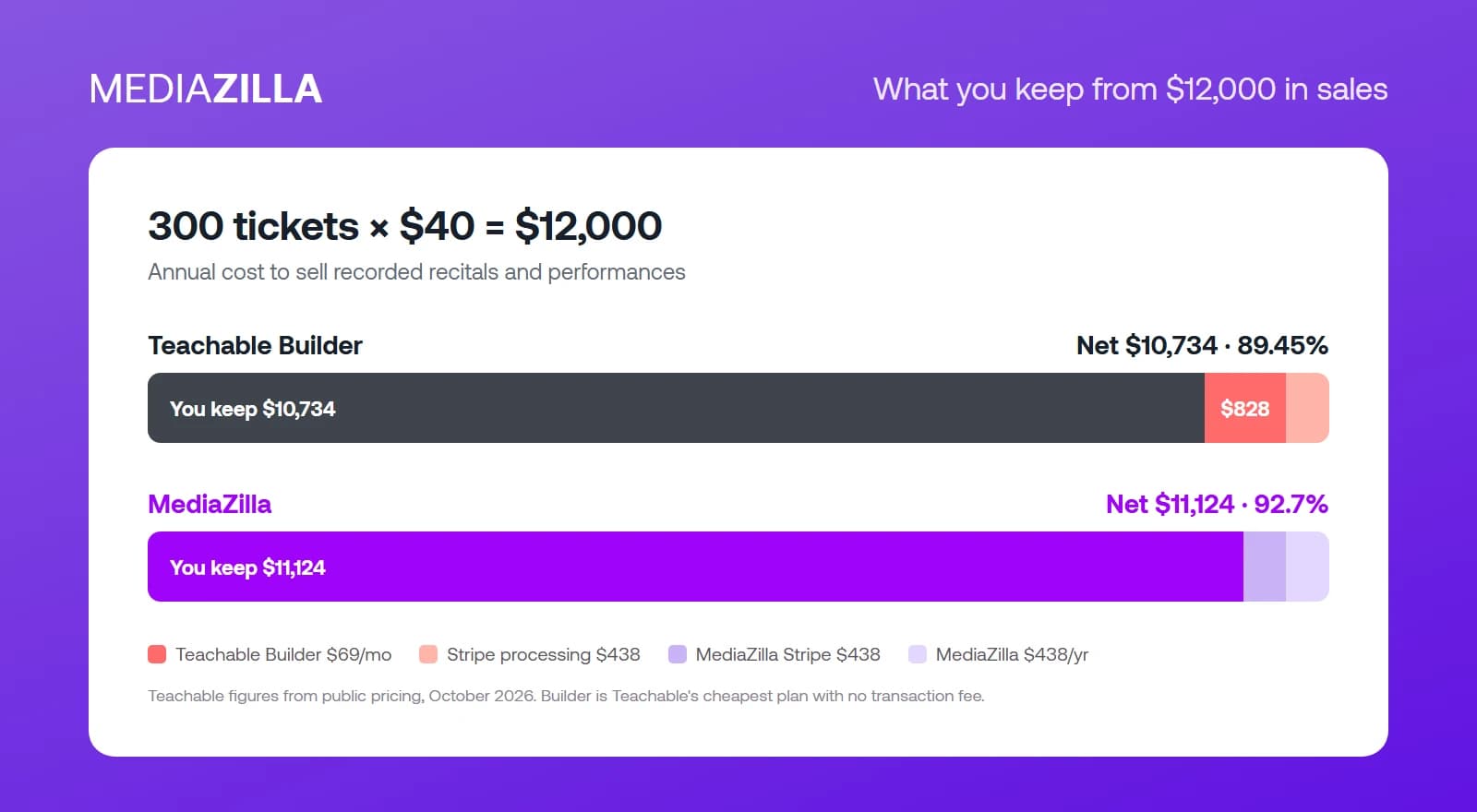
Run the same scenario used across this blog: 300 sales at $40 each, for $12,000 a year. We compare Teachable's Builder plan, the cheapest tier with no transaction fee.
| $12,000 in sales (300 × $40) | Teachable Builder | MediaZilla |
|---|---|---|
| Platform subscription | $828 (Builder, $69/mo) | $438 |
| Platform transaction fee | $0 on Builder | $0 |
| Card processing | $438 (Stripe 2.9% + $0.30) | $438 (Stripe 2.9% + $0.30) |
| Total annual cost | $1,266 | $876 |
| Net take-home | $10,734 (89.45%) | $11,124 (92.70%) |
On Teachable Builder: $828 a year in subscription plus about $438 in Stripe processing. Total: $1,266. Net take-home: $10,734, or 89.45%.
On Teachable Starter: the subscription drops to $348, but the 7.5% fee takes $900. With processing, the total is $1,686 and you keep $10,314, or 85.95%.
On MediaZilla: $438 a year, zero commission, and the same Stripe processing. Total: $876. Net take-home: $11,124, or 92.70%.
The money gap is modest. The bigger difference is what buyers get for their $40: a TV app, DRM, and a presentation that feels like a film.
Who Should Stay on Teachable
- You sell structured courses where quizzes, certificates, and progress tracking are part of the value.
- You run coaching, cohorts, or community alongside your videos.
- Most of your students watch on laptops and phones, not TVs.
If you sell or deliver finished films, you are paying for a classroom your buyers never needed.
How to Switch from Teachable to MediaZilla
Step 1. Export Your Students and Sales
Export student emails, enrollments, and purchase history from Teachable. These records let past buyers keep access after the move.
Step 2. Back Up Your Master Files
Keep original video files on an external drive and in a cloud account you control. Never rely on any platform as your only copy.
Step 3. Rebuild Each Product as a Film
Turn each course into a MediaZilla release: one film or a menu of chapters, with artwork, pricing, and access rules. Connect Stripe and test a purchase yourself on desktop, mobile, and a TV app.
Step 4. Move Past Buyers and Tell Them
Import past buyers so they keep access, then send a short note: the videos moved, access is permanent, and they can now watch on their TV. MediaZilla's team can help with bulk imports.
Step 5. Update Links, Then Close Teachable
Replace Teachable links on your website, emails, and social profiles. Once traffic and sales run through MediaZilla, cancel Teachable at the end of its billing period.
Frequently Asked Questions About Teachable vs MediaZilla
What is the main difference between Teachable and MediaZilla?
How much does Teachable charge per sale?
How much does Teachable cost per month?
Can viewers watch Teachable videos on a TV?
Does Teachable protect videos with DRM?
Is MediaZilla good for selling courses?
Can I sell recital and event videos on Teachable?
Featured Resource
Migrate from Vimeo On Demand before November 20
Apply for a free MediaZilla migration spot. Approved libraries move in 14 days - or we pay you $1,000.
Apply for free migration