VidFlow vs MediaZilla: The Best Alternative to VidFlow for Filmmakers Who Want to Deliver, Sell, and Scale
By MediaZillaUpdated
Switch from VidFlow
Deliver films, sell access, and keep lifetime client access on one platform.
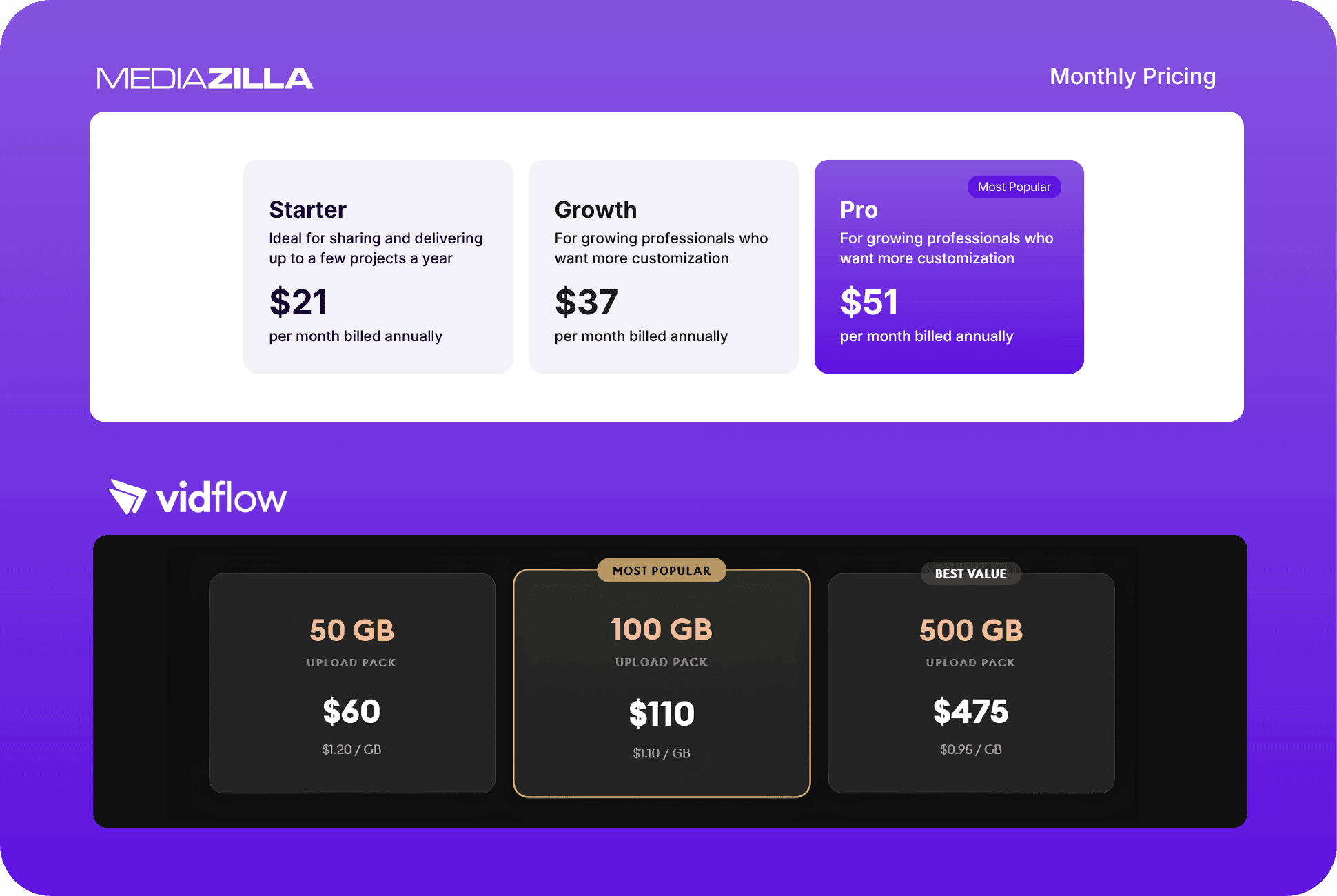
VidFlow delivers clean, branded client galleries but has no native paywall, charges by upload quota, and limits standard gallery access windows. MediaZilla combines premium client delivery, interactive menus, lifetime access, and a zero-commission monetization engine in one platform. If your studio wants to sell video content alongside delivering it, VidFlow cannot do that without additional tools.
What You Actually Need from a Video Delivery Platform
Here is where most wedding filmmakers and event videographers sit right now.
You have clients who paid premium prices for premium work. You deliver their films through a platform. The platform handles storage and playback. Everyone moves on.
That setup works until it does not.
It stops working the moment a client emails three years later and cannot access their gallery. It stops working the moment you want to sell footage from a theater production or dance recital and realize your delivery platform has no checkout. It stops working when a couple tries to watch their wedding film on their television and your platform has no real TV app.
So the question becomes: are you looking for a delivery tool, or a delivery and monetization business?
The answer to that question is the only evaluation that matters.
VidFlow: What It Does Well and Where It Stops
Where VidFlow Genuinely Works
VidFlow builds clean, polished client galleries. The interface is professional. The smart TV integration is a genuine differentiator. For a videographer who delivers one type of content, has no interest in selling access commercially, and upgrades to the Pro tier to remove the badge, VidFlow does what it promises.
It serves over 15,000 wedding filmmakers and hybrid teams. The product works for a specific scope of work.
Where VidFlow Stops
VidFlow stops at delivery. Everything beyond that is outside the product.
No native paywall. If you want to sell access to a dance recital, a theater performance, or any commercial event, VidFlow cannot process that transaction. You need a separate checkout tool running alongside it: Thrivecart, Gumroad, or another system, adding cost, complexity, and two sets of settings to manage.
Storage billed by the gigabyte. The entry plan gives you 35GB for $228 per year. The Pro plan gives you 1TB for $948 per year. To remove the VidFlow badge, you need the Pro plan. Deliver more than 1TB in a year? You buy additional upload packs on top of the annual fee.
Access windows tied to the subscription. Standard gallery deliveries include a fixed-term client access period. After that window closes, you face the question of what you promised at the time of sale. MediaZilla guarantees clients keep access permanently, even after account cancellation. VidFlow does not offer that guarantee.
No commercial DRM. VidFlow provides basic password protection for galleries. That is appropriate for private client delivery. It is not appropriate for commercially sold access where piracy protection matters.
| Capability | VidFlow | MediaZilla |
|---|---|---|
| Upload quota | 35GB entry / 1TB Pro, then extra upload packs | Included in the subscription |
| Gallery access window | Fixed-term client access | Lifetime access, even after you cancel |
| Native monetization | None. Needs Thrivecart, Gumroad, or similar | Built-in checkout, zero platform commission |
| TV app availability | Smart TV integration | iOS, Android, Apple TV, Fire TV, Roku, Android TV |
| Commercial DRM | Basic gallery passwords | Commercial-grade DRM and device limits |
| Direct viewer support | Creator handles client access issues | MediaZilla supports end viewers directly |
MediaZilla: What Changes When You Switch
True Lifetime Client Access
When you deliver through MediaZilla, your client owns access permanently. That guarantee holds even if you cancel your account.
That is a promise you can make at the point of sale. "You will always have access to your film" becomes a concrete deliverable instead of a qualified statement. It is a sales differentiator that no storage quota or access window can replicate.
Interactive, Netflix-Style Menus
MediaZilla lets you build custom interactive menus, scene selections, and multi-video presentations. The viewing experience is cinematic and branded from the first frame.
The first time a client opens their wedding film should feel like an event. A premium presentation reinforces the price you charged. It also generates the referrals that come from family members who see the experience and want to know who made it.
Native Monetization With Zero Commission
MediaZilla supports one-time purchases, rentals, and subscriptions through a built-in checkout. No third-party tool. No platform commission.
If you film dance recitals, theater performances, or any community event, you sell access directly through MediaZilla. You keep all revenue beyond standard Stripe processing fees. The checkout is native. The data stays in one place.
Native TV Apps Across Every Major Platform
MediaZilla delivers on iOS, Android, Apple TV, Fire TV, Roku, and Android TV. Your clients watch their film in the living room without a workaround.
When a couple asks "can we watch this on our TV?", the answer is yes. That answer should not require an explanation.
Content Protection That Matches Premium Pricing
MediaZilla blocks unauthorized downloading and restricts concurrent device access. Commercial-grade DRM protects revenue from piracy.
Basic gallery passwords are adequate for private client delivery. They are not adequate when you are selling access commercially and your revenue depends on controlling who watches.
Direct Viewer Support
MediaZilla handles end-viewer access issues directly. A client who cannot log in contacts MediaZilla, not you.
VidFlow routes viewer support back to the creator. You are the helpdesk for every client who loses access or forgets a password.
The Cost Comparison: What You Actually Keep
Run the same scenario through both platforms.
A high-volume wedding and event filmmaker delivers 1TB of 4K client films per year. They also want to sell $12,000 worth of access to local theater performances and dance recitals.
| Cost on 1TB + $12,000 in sales | VidFlow + Gumroad | MediaZilla |
|---|---|---|
| Platform subscription | $948 (Pro, 1TB, no badge) | $438 |
| Checkout / commission | $1,200 (Gumroad 10%) | $0 platform commission |
| Card processing | Extra, on the checkout tool | ~$438 (Stripe) |
| Total annual cost | $2,148+ | $876 |
| Net take-home | $10,800 minus $948 | $11,124 (92.70%) |
On VidFlow: Reaching 1TB upload capacity and removing the VidFlow badge requires the Pro plan at $948 per year. To sell the event footage, VidFlow has no checkout. Add Gumroad at 10% of every sale, and that takes $1,200 from $12,000 in revenue before any other fee. Total cost to deliver and sell: $2,148 per year before any additional upload pack purchases.
Net take-home on the $12,000 in sales: $10,800 minus the $948 platform fee. You kept less than you expected, and you managed two platforms to get there.
On MediaZilla: MediaZilla handles delivery and monetization on one subscription. Zero platform commission. Stripe processing at 2.9% plus $0.30 per transaction costs roughly $438 at this revenue level. MediaZilla's annual subscription is $438.
Total cost: $876 per year. Net take-home: $11,124. Revenue retained: 92.70%.
The math is this: VidFlow is not cheaper when you include what it cannot do.
How to Switch from VidFlow to MediaZilla
Step 1. Audit Every Active Gallery and Its Access Window
Before touching anything, list every active gallery you have delivered through VidFlow. Note the client name, the delivery date, and the current access expiry.
Identify which clients are still within their active window and which you need to notify about the platform change. This spreadsheet becomes the checklist for the rest of your migration.
Step 2. Download Your Master Files to Two Independent Locations
Download the original video files you uploaded to VidFlow. Store them on a physical external drive and in a cloud storage account you control independently.
Your edit masters belong in a location you own outright. Do not rely on any delivery platform as your only copy of a file. This step applies regardless of which platform you move to.
Step 3. Configure MediaZilla Before Delivering a Single File
Create your MediaZilla account and set up your branded menus, pricing, and access settings before going live with any client.
Upload one film. Test playback on desktop, mobile, and a TV app. If you plan to sell content, complete a test transaction through your own checkout. The first time a real client opens their gallery should not be your first time testing the platform.
Step 4. Re-Deliver Existing Clients on MediaZilla
For clients still within their active VidFlow window, send a direct link to their new MediaZilla gallery. Keep the message clear: the platform has upgraded, their access is now permanent, and the new viewing experience is better.
Lead with the benefit. Most clients respond positively to an upgrade. MediaZilla's support team can assist with bulk imports and access configuration for historical buyer records.
Step 5. Configure Your Monetization Before Your Next Event Season
If you plan to sell recitals or theater footage, set up your MediaZilla paywall, pricing, and checkout before the next performance season begins.
Connect your Stripe account, configure pricing tiers, and run a test purchase yourself. The first customer through your checkout should not be your first time operating it. Test it before it matters.
Step 6. Update All Client-Facing Materials to Reflect the Change
Update your website, package descriptions, and welcome guides to reference MediaZilla and the lifetime access guarantee. That promise belongs in your sales conversation, not buried in fine print.
Remove VidFlow references from proposal templates and email sequences. Forward clients who try old gallery links to their new MediaZilla URL or set up a redirect on any publicly shared links.
Frequently Asked Questions About VidFlow vs MediaZilla
What is the main difference between VidFlow and MediaZilla?
Does VidFlow have a built-in paywall to sell video access?
How does VidFlow's upload quota work?
What happens to my VidFlow client galleries if I cancel my subscription?
Does MediaZilla guarantee lifetime access even if I cancel my account?
Does MediaZilla have native TV apps for client viewing?
Can I sell dance recitals and theater events through MediaZilla?
Is MediaZilla only for wedding videographers?
Featured Resource
Migrate from Vimeo On Demand before November 20
Apply for a free MediaZilla migration spot. Approved libraries move in 14 days - or we pay you $1,000.
Apply for free migration