How to Migrate Your Video Library to a New Hosting Platform Without Losing Customers or Revenue
By MediaZillaUpdated
Free migration offer
Move your Vimeo On Demand library to MediaZilla in 14 days - or we pay you $1,000.
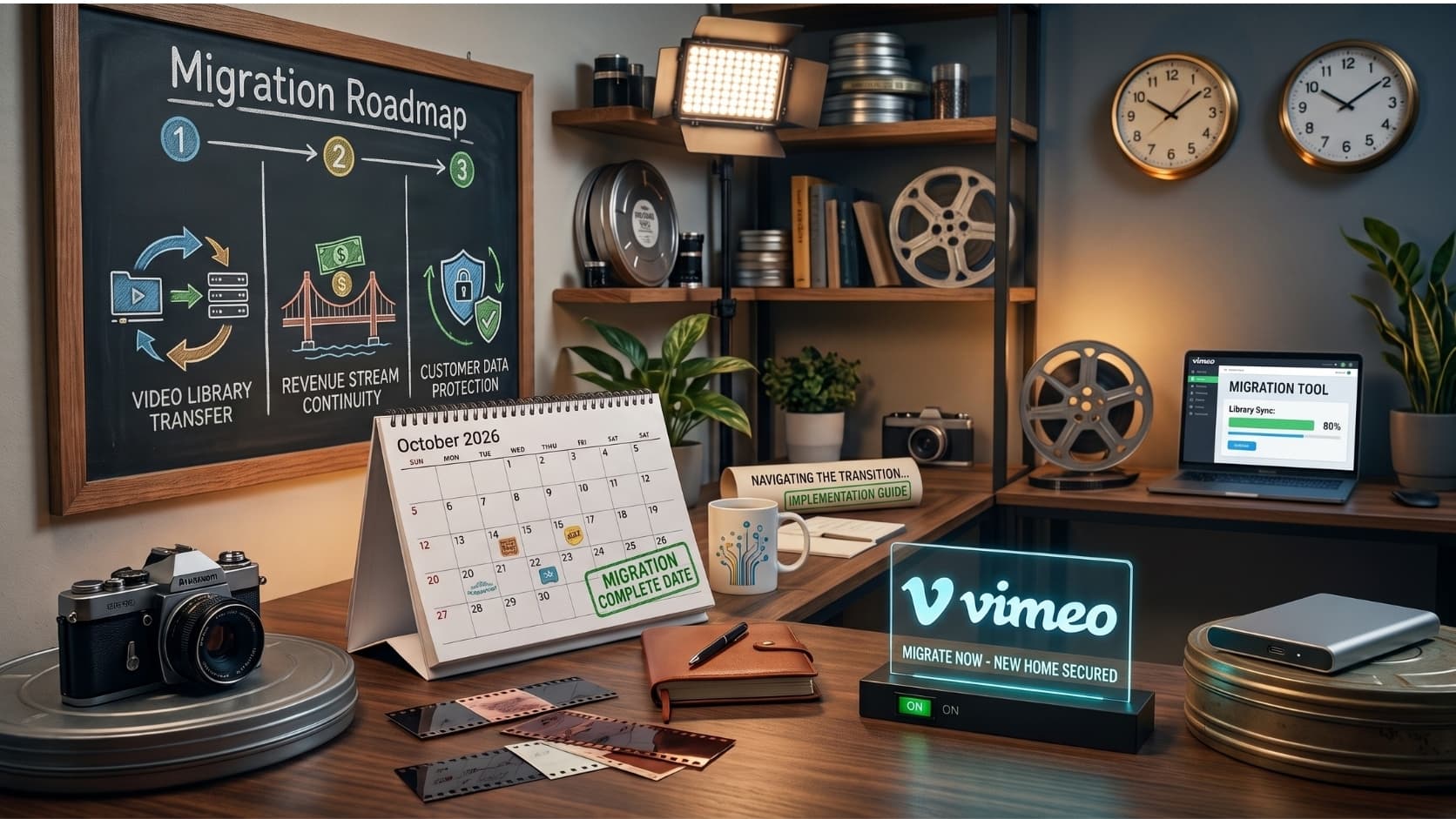
Migrating a video library costs you nothing if you sequence it correctly and everything if you do not. Export buyer data first, audit every embed before touching your subscription, back up master files independently, configure the new platform before announcing it, and communicate to buyers before the cutover. The revenue risk is not the migration. It is waiting.
What You Actually Lose When a Video Platform Shuts Down
You built something real.
You uploaded the films. You attracted buyers. You processed hundreds or thousands of individual transactions and delivered on every one. The platform managed the infrastructure. You did the work.
Then Vimeo sent the email.
The instinct is to act fast. Grab any platform. Upload everything. Move on.
That instinct will cost you customers, revenue, and years of SEO equity you cannot recover.
Your Revenue Stops Before You Think It Does
September 21, 2026 is when new purchases stop. November 20 is when viewer access ends entirely. If you are waiting until fall to act, you have already let sales go.
The date that costs you money is not November. It is September 21.
Your Buyer List Is Smaller Than You Think
Vimeo does not export your full buyer list. It exports email addresses only for buyers who explicitly opted into your updates.
Every buyer who did not opt in is unreachable after the shutdown. You can see their transactions. You cannot contact them.
Your Links Become a Public Record of Abandonment
Every embed code you have placed on your website will break. Every Vimeo URL in a press kit, social bio, email sequence, or festival application points to a dead page.
That is not just a broken experience for your viewers. It is permanent SEO equity loss for pages that may have ranked in search results for years.
Your Buyers Will Blame You
Vimeo tells customers to download what they can before November 20. Most will not. They will email you asking why the film they paid for no longer plays.
You will have to explain that the platform you trusted closed. That conversation happens whether or not you migrated cleanly. The only variable is what you can offer them when they ask.
What Your Next Platform Must Be Able to Do
Choosing a replacement based on monthly price is the wrong starting point.
The right question is: what does a professional video business actually need to protect its customers, revenue, and content after a migration?
Eight capabilities are non-negotiable. Treat them as your audit checklist before committing to anything.
- Content protection. Access controls, DRM, and secure delivery are not optional extras for a professional video business.
- Per-customer access control. Grant or revoke access per buyer and per title without requiring a new purchase.
- Historical buyer import. Customers who paid you should not be forced to pay again after a migration.
- Frictionless checkout. Rental, purchase, and subscription flows from a single point.
- Useful analytics. Which films sell, where viewers stop watching, what drives conversions.
- Reduced support burden. Payment errors, login problems, and access questions handled by the platform.
- Branded ad-free player. Your buyers are watching your work. They should not see another company's advertising while doing it.
- TV app delivery. Web-only is not enough. Customers expect to watch films on their television.
Now apply that checklist to the platforms most often proposed as replacements.
Kajabi fails on upload limits (4 GB per file), offers no native TV apps, and is built for online courses rather than films.
Gumroad charges 10% on every transaction, offers no TV apps, and provides no tools to import historical buyer records.
SproutVideo offers secure video hosting but lacks a native checkout engine and provides no TV app delivery.
None of the three pass the full audit. That narrows serious consideration to four platforms: Uscreen, Dacast, Muvi, and MediaZilla.
How the Numbers Actually Break Down Across Platforms
The lowest monthly price is not the lowest operating cost. That distinction costs filmmakers thousands of dollars per year.
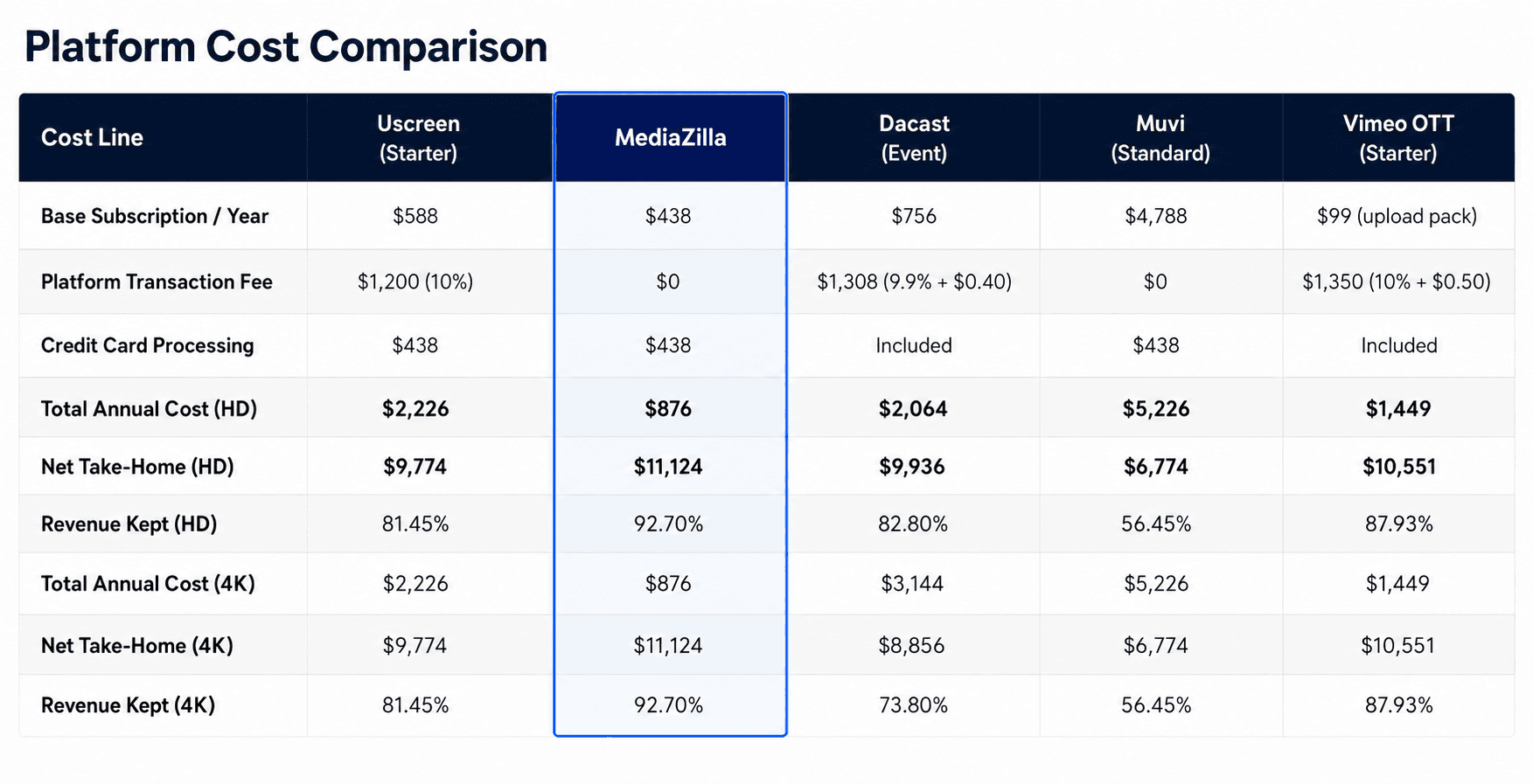
Apply the same scenario to each platform. A filmmaker releases three 120-minute films per year, sells each to 100 customers at $40 per sale. That is 300 annual transactions and $12,000 in gross annual revenue.
What the Transaction Fee Actually Costs
Uscreen charges 10% per transaction. At $12,000 in annual sales, that is $1,200 in platform fees before anything else. The fee is not fixed. It scales with your growth. Every new customer you acquire generates platform revenue, not just your own.
What Bandwidth Pricing Does to 4K Content
Dacast charges more when your content looks better. Streaming 9.6 TB of 4K footage adds $1,080 in bandwidth fees beyond the base subscription. Net take-home drops to 73.80% of gross revenue.
The better your films look, the more you pay.
What Enterprise Pricing Looks Like on an Independent Scale
Muvi costs $4,788 per year before a single sale is made. That subscription alone consumes 39.9% of gross revenue in this scenario. The infrastructure is enterprise-grade. The pricing reflects it.
What Vimeo OTT Actually Provides at the Starter Tier
Vimeo OTT Starter carries 10% plus $0.50 per transaction. Total annual cost at this volume is $1,449. The Starter plan is web-only. No iOS app, no Android app, no Apple TV, no Roku, no Fire TV.
Any customer who wants to watch your film on a television cannot.
What a Flat-Rate Zero-Commission Model Produces
MediaZilla charges $438 per year with zero platform commission. Total annual cost at this scenario is $876. Net take-home is $11,124 in both HD and 4K. Revenue retained is 92.70%.
Transaction fees compound. Bandwidth penalties grow with content quality. A flat-rate, zero-commission model is the only structure that rewards your growth instead of taxing it.
How to Migrate Your Video Library Step by Step
Step 1. Run a Full Inventory Before Moving Anything
Before migrating a single file, catalog everything you own. List every video title, its resolution, its runtime, and its storage size. Note which titles generate the most revenue and which have the most active buyers. These are your priority assets and they move first.
Alongside your content inventory, build a location audit. List every page on your website where a video is embedded or linked, every press kit URL, every email sequence containing a video link, and every third-party site pointing to your Vimeo storefront. A spreadsheet with this information is not optional preparation. It is the document that prevents broken experiences for real viewers on a specific future date.
Step 2. Export All Buyer Data Before Touching Your Subscription
Log into Vimeo On Demand's analytics dashboard now, before changing anything about your plan. Download every available export: buyer email addresses, revenue by title, purchase dates, watch data, and traffic sources.
Vimeo exports email addresses only for buyers who opted into your communications. That is likely a fraction of your total buyer base. Export what is available and document the gap precisely. Knowing who you cannot reach is as important as knowing who you can.
Do not cancel or downgrade your Vimeo plan until this step is complete. Analytics exports may be gated behind your current subscription tier.
Step 3. Back Up Your Master Files Independently
Download your original video files from Vimeo and store them in at least two separate locations: one physical external drive and one cloud storage account you control independently.
These are your original exports from the edit, not compressed streaming copies. If a platform restricts or loses access to your content, the master file is your fallback. Do not assume any platform stores them indefinitely under all circumstances.
Step 4. Choose and Configure the New Platform Before Announcing It
Do not point your audience to a new platform address until it is fully built, tested, and operational.
Set up your account on the new platform. Upload one film. Verify playback on web and on mobile. Complete a test purchase using a real payment method. Confirm that the branded player displays correctly. Verify that buyer access works end-to-end from purchase through playback.
A premature announcement directing your audience to a half-built destination is worse than a delayed one. If you are migrating to MediaZilla, their team handles the upload and organization of your eligible library directly. The 14-day migration guarantee gives you a firm completion date to anchor your customer communications around.
Step 5. Update Every Embed Code and Set 301 Redirects
Work through the location audit from Step 1 systematically. Replace every old embed code with the new platform's player embed. For every Vimeo On Demand URL that ever appeared in search results, create a 301 redirect pointing to the equivalent page on your new platform or website.
A broken embed means a viewer encounters an error where a film should play. A missing redirect means Google loses the connection between your content and the URLs that accumulated search authority over time. Both losses are preventable. Neither is recoverable after the fact without significant effort.
Step 6. Communicate to Your Buyers Before the Switch Goes Live
Send an email to every address you exported in Step 2. Be direct. Tell them the platform is changing. Tell them the new location. Tell them what to expect regarding access to previously purchased content. Give them a specific date.
Send it more than once. Buyers who purchased your films months or years ago may have changed email addresses or filtered your communications. A two-email sequence with specific subject lines outperforms a single announcement buried in a newsletter.
For buyers you cannot reach directly, place a visible announcement on your website and social profiles before the switch happens. Zero surprises for paying customers. Surprises produce refund requests and chargebacks, not goodwill.
Frequently Asked Questions About Video Library Migration
Can I migrate my video library from Vimeo On Demand without re-uploading every file manually?
What happens to customers who purchased my films on Vimeo On Demand?
How long does a full video library migration take?
Will I lose my video analytics when I switch platforms?
Do I need to notify my customers before migrating to a new platform?
How do I protect my SEO rankings when I switch video platforms?
What is the real cost of a video platform with transaction fees?
Which video platforms support TV app delivery for independent filmmakers without enterprise pricing?
Featured Resource
Migrate from Vimeo On Demand before November 20
Apply for a free MediaZilla migration spot. Approved libraries move in 14 days - or we pay you $1,000.
Apply for free migration