Vimeo On Demand Is Shutting Down: The Key Dates and Deadlines Every Creator Must Know
By MediaZillaUpdated
Free migration offer
Move your Vimeo On Demand library to MediaZilla in 14 days - or we pay you $1,000.
Vimeo On Demand permanently shuts down on November 20, 2026, but revenue stops on September 21 when new purchases close. Four deadlines matter: August 22 (no new uploads), September 21 (no new sales), October 21 (final payouts), and November 20 (storefronts offline, buyer access ends). Most creators are focused on the wrong date.
The Deadline Nobody Is Talking About
September 21. Not November 20.
Most creators are watching the wrong date. By the time November arrives, your revenue will have been dead for two months.
September 21, 2026 is when Vimeo closes new purchases and subscriptions. Your storefront stays visible after that date. But it cannot process a transaction.
Every article you have ever written, every social post, every embed pointing at your Vimeo storefront takes people to a page that accepts no money.
You are not managing a platform migration. You are managing a revenue cliff with a hidden edge.
Vimeo On Demand shutdown timeline
September 21 is the date that stops your income.
August 22
2026
No new uploads
September 21
2026
Revenue cutoff
October 21
2026
Final payouts
November 20
2026
Storefronts offline
Two months of dead revenue sit between the purchase cutoff and the November 20 closure date.
The Four Dates That Determine Everything
These are Vimeo's official deadlines from its shutdown notice and seller FAQ. Each one has a different consequence for your business.
August 22, 2026: New Uploads Blocked
Starting August 22, new uploads are no longer accepted. Your existing pages remain live and your current content stays available.
But you cannot add new titles, new episodes, or new content to your storefront after this date. If you planned to release anything before the platform closed, that window is shut.
September 21, 2026: Revenue Stops
This is the date your business actually stops. Not November.
Starting September 21, no new purchases or subscriptions are accepted. Existing viewer access continues until November 20, but no new money comes in after September 21. Active subscriptions do not auto-renew after this date. Vimeo cancels them automatically.
Your recurring revenue disappears. Your one-time purchase window closes. The storefront stays visible. It cannot complete a sale.
October 21, 2026: Final Payouts Processed
October 21 is the last money you receive from Vimeo On Demand. Whatever revenue was generated from eligible sales up to September 21 processes on this date.
After October 21, there is no more income from Vimeo On Demand, ever.
November 20, 2026: Everything Goes Dark
Every link, every embed, every storefront. Gone.
Storefronts go offline. Customers lose streaming access to everything they purchased. Every URL you ever shared, every press kit, every email signature, every social post points at nothing.
This is the date most creators are worried about. But by this point, two months of revenue are already gone and your buyers have been in limbo.
What the Shutdown Actually Takes From You
This is not just a platform migration. Here is the specific list of what disappears on November 20.
Your Storefront Links Die
Every URL you ever distributed becomes a dead link. Press kits, festival applications, email campaigns, social bios, website footers.
The accumulated SEO equity in those URLs goes with them unless you set 301 redirects before the shutdown.
Your Buyers Lose Access
Streaming access to all VOD titles ends on November 20 for every buyer, regardless of when they purchased. Vimeo encourages viewers to download content before the deadline.
Most will not download. They will email you asking why the film they paid for no longer plays.
Your Customer List Does Not Travel
Purchases and entitlements cannot be transferred to other platforms. Vimeo exports email addresses only for buyers who explicitly opted into your updates.
Every buyer who did not opt in is unreachable. You can see their transaction history. You cannot contact them.
Your Video Files Are Safe
Your underlying Vimeo videos will not be deleted. They remain in your Vimeo account under your current plan's storage terms.
The shop is closing. The stock stays. But download your master files independently anyway. Do not assume any platform stores them permanently under all circumstances.
Why Vimeo OTT Is Not the Safe Exit It Looks Like
Vimeo recommends Vimeo OTT as the migration destination. It looks like the obvious move. Same company. Familiar interface. Your library is already there.
Here is the problem.
Both Vimeo OTT and Brightcove, the alternatives Vimeo points you toward, are owned by Bending Spoons. The same company that acquired Vimeo, cut its entire video engineering team, and closed Vimeo On Demand.
The pattern is not a secret. Buy a known brand. Cut the staff. Raise the price. Close what does not pay.
You already migrated once. Choosing the same owner for your replacement means you may migrate again.
Four specific problems with Vimeo OTT Starter worth understanding before you commit:
- No middle tier. You are either on Starter or negotiating an Enterprise contract with pricing only Vimeo can see.
- Web-only on Starter. Native iOS, Android, Apple TV, Roku, and Fire TV apps require Enterprise. Customers who want to watch your films on a television cannot at the standard tier.
- 10% plus $0.50 per transaction. Every sale increases the platform's cut. As your revenue grows, so does their share.
- Same ownership risk. You are trusting the company that just closed the platform you are migrating away from.
The recommended exit is not neutral advice. It is a business referral from the company that created this problem.
| Cost factor | Vimeo OTT Starter | MediaZilla |
|---|---|---|
| Transaction fees | 10% + $0.50 per sale | Zero platform commission |
| TV app access | Enterprise only | Included at standard tier |
| Annual cost on $12,000 gross | $1,449 | $876 |
| Net take-home | $10,551 (87.93%) | $11,124 (92.70%) |
What Your Revenue Looks Like on Each Platform After You Migrate
This is not about features. This is about math.
Apply the same scenario to each platform. A filmmaker releases three 120-minute films per year, sells each to 100 customers at $40. That is 300 annual transactions and $12,000 in gross annual revenue.
| Platform | Total Annual Cost | Net Take-Home | Revenue Kept |
|---|---|---|---|
| MediaZilla | $876 | $11,124 | 92.70% |
| Vimeo OTT Starter | $1,449 | $10,551 | 87.93% |
| Dacast Event | $2,064 | $9,936 | 82.80% |
| Uscreen Starter | $2,226 | $9,774 | 81.45% |
| Muvi Standard | $5,226 | $6,774 | 56.45% |
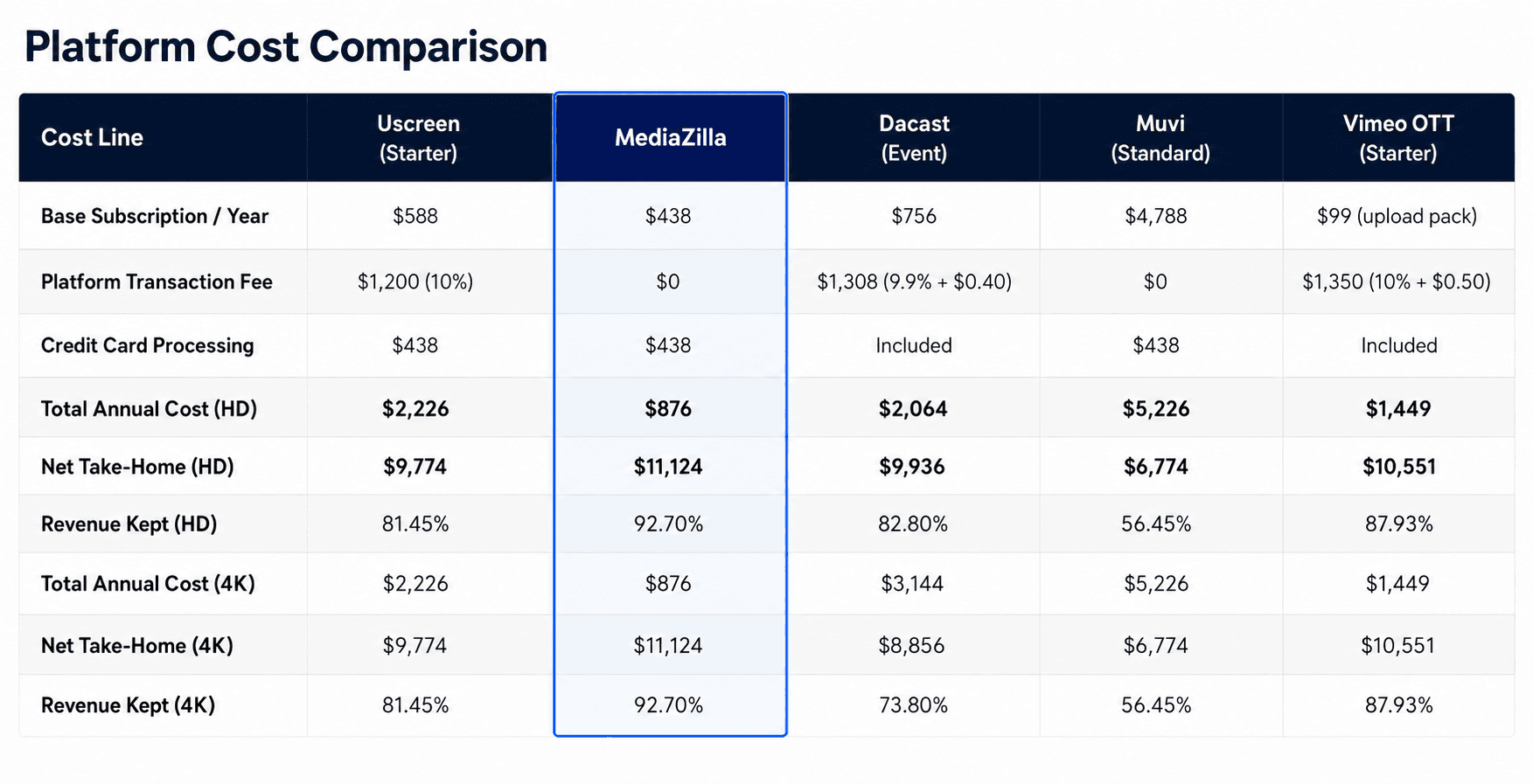
The gap gets worse at 4K. Dacast charges bandwidth fees for 4K content. At 9.6TB of 4K streaming, that adds $1,080 in penalties above the base subscription. Net revenue on Dacast drops to 73.8%.
Uscreen's 10% transaction fee strips $1,200 from $12,000 in annual revenue before any other cost. The fee scales with your success. Every new customer you earn generates platform revenue, not just your own.
MediaZilla charges $438 per year and zero platform commission. The math is the same whether you sell HD or 4K, whether you sell 100 units or 1,000.
How to Act on These Deadlines Before They Pass
Step 1. Export Your Buyer Data and Analytics Today
Log into your Vimeo On Demand analytics dashboard now, before changing anything about your plan. Download every available export: buyer email addresses, revenue by title, purchase dates, watch data, and traffic sources.
Do not cancel or downgrade your plan first. Analytics exports may be gated behind your current subscription tier. Export everything before you touch anything.
Step 2. Download Your Master Files to Two Independent Locations
Your video files stay in your Vimeo account, but do not treat that as a permanent backup. Download your original master files and store them in at least two places: a physical external drive and a cloud storage account you control independently.
These are your original edit exports, not compressed streaming copies. You need them regardless of which platform you move to. This is the one step nobody else can do for you.
Step 3. Build a Location Audit of Every Link and Embed You Have Ever Published
List every page on your website with an embedded Vimeo player. List every press kit, email campaign, social bio, and third-party page that links to your Vimeo storefront.
This becomes your redirect and embed-update checklist. Without it, you will discover broken experiences scattered across a public record built over years, long after the deadline to fix them cleanly has passed.
Step 4. Configure and Test the New Platform Before Announcing It
Set up your account on the replacement platform. Upload one film. Complete a test purchase with a real payment method. Verify playback end-to-end from purchase through viewing.
Do not point your audience to the new destination until it is fully operational. A premature announcement directing people to a half-built platform is worse than a delayed one. MediaZilla offers managed migration with a 14-day completion guarantee for approved sellers, which gives you a firm date to anchor communications around.
Step 5. Set 301 Redirects for Every Vimeo URL in Search Results
Work through your location audit from Step 3. Set 301 redirects from every Vimeo On Demand URL that appeared in search results to the equivalent page on your new platform or website.
A 301 redirect tells Google the page moved rather than died. Without it, every URL that ever ranked in search results becomes a dead end and that accumulated search equity disappears permanently.
Step 6. Notify Your Buyers Directly Before the Platform Switch
Send an email to every address you exported in Step 1. Tell them the platform is changing. Tell them where to go. Give them a specific date.
Send it more than once. Two emails with specific subject lines outperform one announcement. For buyers you cannot reach directly, place a visible notice on your website and social profiles before the cutover. Zero surprises for paying customers. Surprises produce chargebacks, not goodwill.
Frequently Asked Questions About the Vimeo On Demand Shutdown
When does Vimeo On Demand actually stop accepting new purchases?
Will my videos be deleted when Vimeo On Demand shuts down?
What happens to customers who already bought my content?
Can I export my buyer list from Vimeo On Demand?
Should I migrate to Vimeo OTT?
How long does a full migration from Vimeo On Demand take?
What is the best alternative to Vimeo On Demand for independent filmmakers?
Is Vimeo itself shutting down, or just Vimeo On Demand?
Featured Resource
Migrate from Vimeo On Demand before November 20
Apply for a free MediaZilla migration spot. Approved libraries move in 14 days - or we pay you $1,000.
Apply for free migration