What Are the Best Alternatives to Vimeo On Demand in 2026?
By MediaZillaUpdated
Free migration offer
Move your Vimeo On Demand library to MediaZilla in 14 days - or we pay you $1,000.
Vimeo On Demand shuts down November 20, 2026. Compare MediaZilla, Uscreen, Dacast, and Muvi on real costs, features, and which platform lets you keep the most revenue.
You built your video business on a platform that just told your customers their purchases will disappear. Every press kit you ever sent, every festival programme that listed your Vimeo page, every link in every email you wrote to buyers, all of it points at nothing after November 20.
That is the real cost. Not the migration effort. The cost is what it does to the trust you spent years building with your audience.
The fear you are carrying right now is specific. You are not afraid of learning new software. You are afraid of picking the wrong platform, going through this entire process, and finding yourself here again in three years.
That fear is correct. And it should drive every decision you make next.

Why Vimeo OTT Is Not the Safe Move You Think It Is
Is migrating to Vimeo OTT just another trap?
Vimeo puts Vimeo OTT in front of you because it is the path of least resistance. Same company, familiar interface, shorter migration. But the company that shut down Vimeo On Demand while your customers still had active purchases is the same company you would be trusting with your next business.
There is no proof Vimeo OTT will shut down. But there is proof that Vimeo will discontinue a product, strand your customers, and hand you the clean-up bill. That happened once already.
Before migrating to Vimeo OTT, consider the structure you are stepping into:
- No middle tier. Starter or Enterprise. You are either a beginner or you are negotiating a private enterprise contract where you will never know whether a competitor got a better rate.
- Starter is web-only. Apple TV, Roku, Fire TV, and native iOS and Android apps require Enterprise pricing. If your customers want to watch on their television, the Starter plan cannot serve them.
- Transaction fees that scale against you. One-time purchases cost 10% plus $0.50 per transaction. Every time your sales grow, Vimeo OTT earns more. You have no fixed cost. You have a business partner who takes more as you succeed.
- Email-only support, business hours only. Starter support runs Monday through Friday, 9am to 5pm Eastern. If something breaks on a Saturday night when a customer is trying to buy your film, you handle it yourself.
- Loyal customers cost you more, not less. If one customer buys five films, Vimeo charges the 10% cut plus $0.50 five separate times. There is no loyalty discount for customers who love your work.
You already have to migrate once. That is a settled fact. The only question is whether you migrate onto another Vimeo product or onto a platform that gives you a stable foundation to build from.
What Your Next Platform Must Actually Do
What features are non-negotiable for a Vimeo On Demand replacement?
Choosing a replacement is not a hosting decision. It is a business survival decision. Your next platform must:
- Protect your content. One purchase must not become unlimited access. Controlled delivery with viewer authentication is required.
- Control who watches. Authorized buyers get in. Everyone else does not. The platform manages this without your intervention.
- Preserve existing buyer access. Past customers should not have to repurchase to keep what they already paid for. A platform that forces that creates customer service disasters and refund demands.
- Handle payments cleanly. Rentals, purchases, and subscriptions through a simple checkout that does not confuse or lose a sale mid-funnel.
- Show you useful analytics. What customers watch, where they stop, what keeps them engaged.
- Reduce your support workload. Payment issues, login problems, access questions. These should be handled by the platform, not your inbox.
- Deliver a premium viewing experience. Ad-free. Branded. Fast. The viewer should feel like they are watching through your platform, not a third-party service.
- Work on every screen. Web, mobile, and TV. Customers who want to watch your film on their television should be able to.
Any platform that cannot check all eight boxes will cost you something: revenue, customers, support time, or credibility.

Why Kajabi, Gumroad, and SproutVideo Fall Short
Can I use Kajabi or Gumroad as a Vimeo On Demand replacement?
These platforms are not bad products. They are wrong products for this job.
Kajabi is built for courses, not films. It caps uploads at 4 GB per file. A 120-minute HD film sits at roughly 42 GB. A 4K version runs close to 96 GB. You cannot get your content onto the platform. It also lacks native TV apps and serious video security controls.
Gumroad is easy to set up, and it takes 10% of every sale. At $12,000 in annual revenue, that is $1,200 gone to a platform that still gives you no TV app and no tools to restore past buyer access after migration.
SproutVideo handles secure video hosting competently. But it has no native checkout engine and no native TV apps. You would need to bolt on a separate payment solution and tell your TV-watching customers they are out of luck.
The goal here is not to find the most platforms worth dismissing. It is to avoid a second migration. Every platform that is missing a single critical feature is a platform you will eventually have to leave.
What These Platforms Actually Cost: Real Numbers
How much revenue do you actually keep on each platform?
This is where most comparison articles stop at the monthly subscription price and move on. That is the wrong number to look at.
Consider a filmmaker releasing three 120-minute films per year. Each film sells to 100 customers at $40. That is 300 annual sales and $12,000 gross annual revenue.
Here is what each platform actually costs that filmmaker:
| Platform | Annual Platform Cost (HD) | Net Revenue Kept | Percentage Kept |
|---|---|---|---|
| MediaZilla | $438 | $11,562 | 100% |
| Uscreen (Starter) | $1,788 | $10,212 | 85.10% |
| Dacast (Event) | $2,064 | $9,936 | 82.80% |
| Vimeo OTT (Starter) | $1,449 | $10,551 | 87.93% |
| Muvi (Standard) | $4,788 | $7,212 | 60.10% |
What these numbers reveal:
Uscreen takes 10% of every transaction. On $12,000 in revenue, that is $1,200 in transaction fees before the annual subscription is added. Every time your sales grow, Uscreen's cut grows too.
Dacast charges 9.9% plus $0.40 per transaction. Streaming 4K content also triggers bandwidth overage charges. At 9.6 TB of 4K delivery, that is an additional $1,080 in overages that drops your actual take-home from 82.80% to 73.80%.
Muvi's $4,788 minimum annual subscription absorbs 39.9% of your total gross revenue before you sell a single film. Before one customer clicks play. That is a business partner taking almost half your earnings off the top.
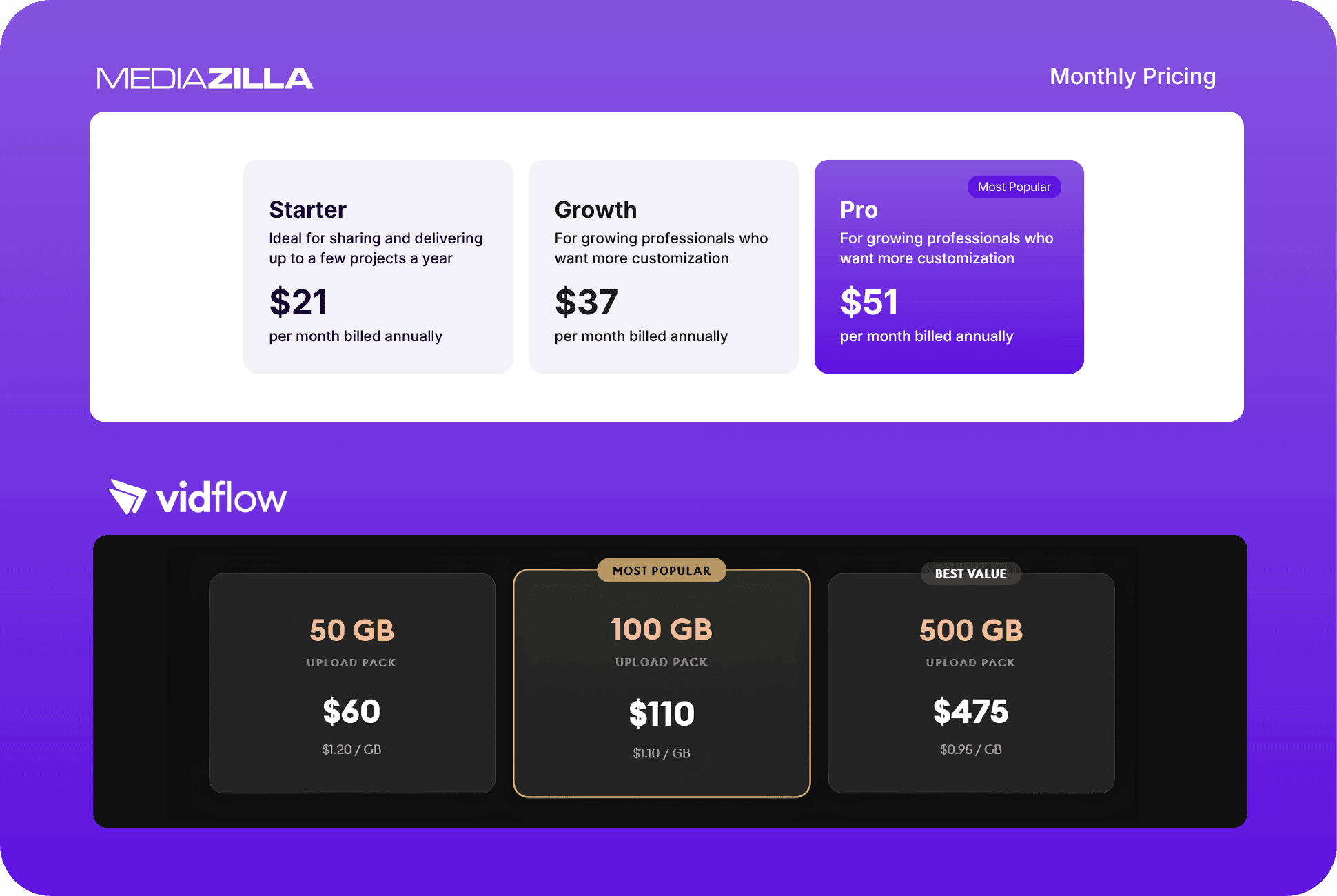
MediaZilla charges $438 flat. Zero transaction fees. Zero bandwidth penalties. Whether you sell 300 films or 3,000, your platform cost does not change. You keep 100% of everything you earn.
Vimeo OTT Starter costs $1,449 annually when you account for the 10% transaction cut plus $0.50 per transaction plus the $99 upload package. You keep 87.93%. And Starter is still web-only, with no native TV apps.
The cheapest monthly price is not the cheapest platform. Do the math on what you actually keep.
Why MediaZilla Wins on Revenue Retention
What makes MediaZilla different from other Vimeo On Demand alternatives?
Most platforms charge less upfront and earn more as you grow. MediaZilla inverts that model.
- Zero transaction fees. MediaZilla charges a flat annual subscription. Sell 10 films or 10,000, the platform cost does not move. Your revenue retention does not decrease as your audience grows.
- Past buyer access preserved. Customers who purchased your content through your old platform can retain access after migration without being asked to pay again. This protects the relationship you spent years building.
- Branded, ad-free delivery. Your customers watch through your brand, not MediaZilla's. No third-party ads appear next to your films. The experience your audience has is the one you designed.
- TV delivery included. Compatible TV platforms are supported without requiring an enterprise contract negotiation.
- Secure content protection. Controlled viewer access means one purchase does not become unlimited sharing. Your content stays protected.
- Migration assistance, guaranteed. MediaZilla offers free migration to 10 approved Vimeo On Demand businesses per week. The approved video library moves within 14 days or MediaZilla pays you $1,000 for the delay.
The question is not which platform has the most features. It is which platform gives your business the strongest combination of protection, revenue retention, and stability over time.
How to Migrate From Vimeo On Demand Before the Deadline
Step 1 - Back Up Your Original Video Files Immediately
Do not wait on this. Download the original master files for every piece of content you have on Vimeo On Demand. Vimeo states that the underlying video files will remain in your account under your storage plan terms, but original masters should be in your own storage before any deadline passes. External drives, cloud storage, both. Do not rely on a platform you are leaving to protect your content files.
Step 2 - Export Your Buyer and Subscriber Data Now
Vimeo allows you to export email addresses only for viewers who explicitly opted in to receive updates from you. This is a critical limitation. Go into your Vimeo On Demand analytics dashboard and export every piece of buyer data available to you before the shutdown dates hit. This is your customer list. Losing it means starting your audience relationship from scratch.
Step 3 - Evaluate Platforms Against the 8 Non-Negotiables
Every platform you consider should be tested against all eight requirements: content protection, buyer access control, past buyer preservation, payment handling, analytics, support load, premium experience, and multi-device delivery. Eliminate any platform that cannot meet all eight before you spend time on a deeper evaluation.
Step 4 - Run the Real Cost Math, Not the Subscription Price
Take your actual annual revenue from Vimeo On Demand and apply each platform's fee structure to it. Transaction percentages, bandwidth caps, upload limits, support tier restrictions. The platform cost comparison table above runs this calculation for a $12,000 revenue scenario. Run it for your own numbers.
Step 5 - Apply for Your Migration Spot Before Spots Fill
MediaZilla accepts 10 approved Vimeo On Demand migrations per week. Apply for a migration spot, submit your files and access credentials once approved, and the team completes the migration within 14 days. The annual plan includes double the standard upload quota for the first year, one additional month at no cost, and a 30-day money-back guarantee. If the 14-day deadline is missed, MediaZilla pays you $1,000.
Step 6 - Communicate the Change to Your Customers Before It Happens
Your buyers are about to receive Vimeo's shutdown notice. They will have questions. Some will be confused. Some will be angry. Get ahead of it. Email your list before the platform emails them. Explain where your films are moving, when access transfers, and what they need to do (likely nothing). Customers who hear from you directly, before they hear from Vimeo, trust you more than customers who get the bad news cold.
Frequently Asked Questions
What is the Vimeo On Demand shutdown deadline?
What happens to my customers' purchases when Vimeo On Demand shuts down?
Can I export my buyer email list from Vimeo On Demand?
Is Vimeo OTT a safe replacement for Vimeo On Demand?
Which Vimeo On Demand alternative keeps the most of my revenue?
How long does a Vimeo On Demand migration take?
Do I need to ask past buyers to repurchase after I migrate?
Featured Resource
Migrate from Vimeo On Demand before November 20
Apply for a free MediaZilla migration spot. Approved libraries move in 14 days - or we pay you $1,000.
Apply for free migration