Email List vs Social Followers: How Filmmakers Turn an Audience Into Buyers
By MediaZillaUpdated
Free migration offer
Move your Vimeo On Demand library to MediaZilla in 14 days, or we pay you $1,000.
Followers see your post when an algorithm decides. Subscribers get it because you sent it. Here is why the list you own matters more, where to collect emails, and what to send before and after a film launch.
You have 10,000 followers. How many will buy? Most filmmakers don't know, because a follower is not a customer. A follower sees your post when an algorithm decides to show it. An email subscriber gets your message because you sent it.
That difference decides whether a film launch fills your inbox with orders or goes quiet. Here is how to turn an audience into buyers, and why the list you own matters more than the count you borrow.
Why Don't Followers Equal Buyers?
- You don't control reach. A platform decides how many followers see each post.
- You can't message them directly. There is no way to say "the film is live" to every follower.
- You can't take them with you. If the account is lost or the platform changes, the audience stays behind.
- You can't see who they are. A follower count tells you nothing about who would pay.
What Did the AFM Panel Say?
At the American Film Market, a panel on built-in audiences, reported by Media Play News, made two points that matter to independent filmmakers.
- An established audience can give a filmmaker leverage in getting a film financed, made, and distributed.
- Followers alone don't guarantee commercial success. One filmmaker said email had been more useful than social media for turning interest into ticket sales.
That is one filmmaker's experience, and we don't treat it as a benchmark. It does match how the money works: an audience you can reach again is worth more than one you can only hope to reach.
What Does the Math Look Like?
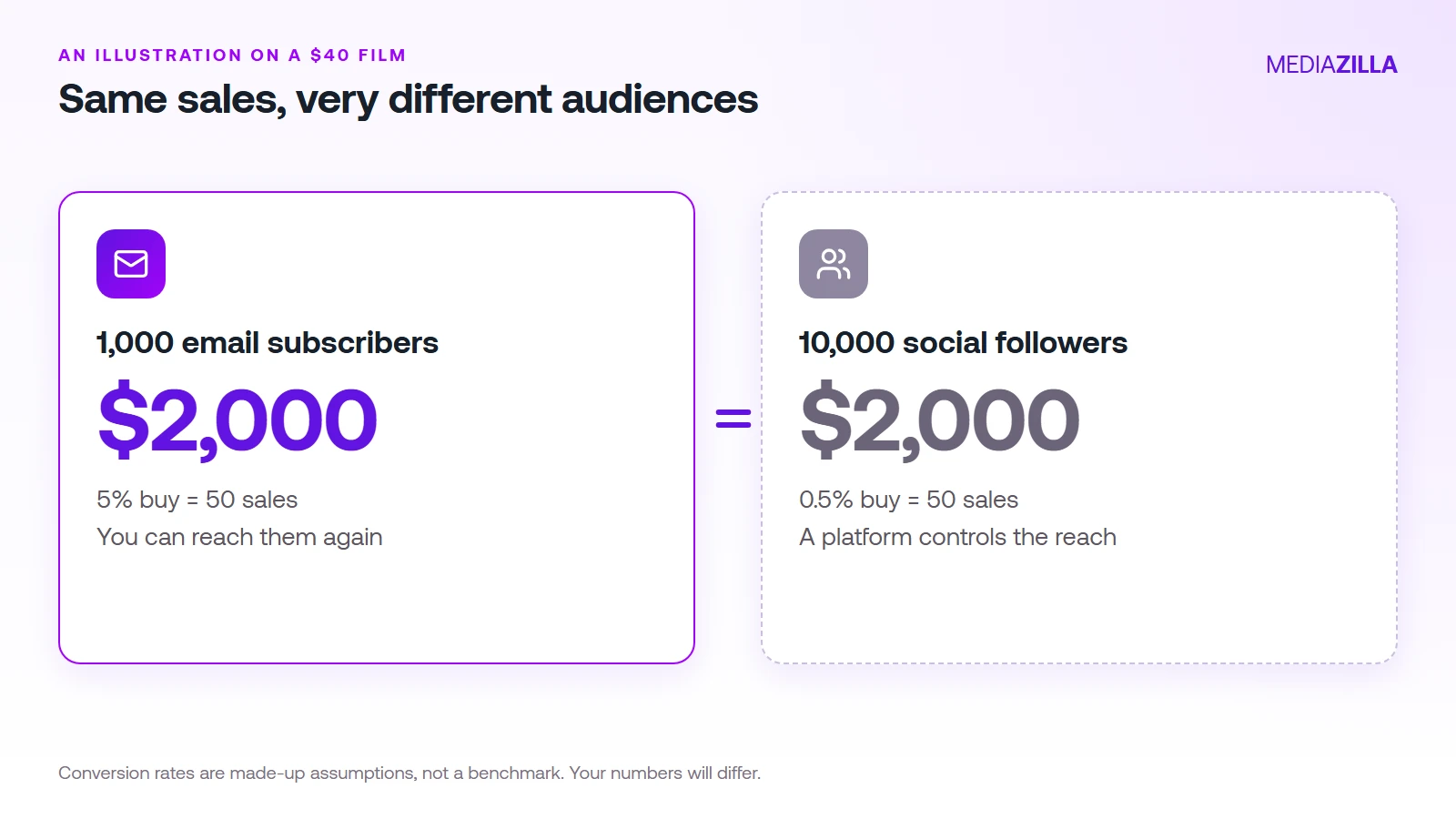
Here is an illustration. The conversion rates are assumptions, not data. A $40 film, and two audiences:
- 1,000 email subscribers at 5% buying = 50 sales, which is $2,000.
- 10,000 followers at 0.5% buying = 50 sales, which is $2,000.
The point is not which number is right. It is that a small list can do the work of a large following, and you can contact the list again for the next film at no cost.
Where Do You Collect Emails?
- On the film's page. A trailer with a "notify me" box converts curiosity into a name.
- At screenings. A QR code on a slide at a festival or local screening.
- In your social bio. One link, one promise, such as "early access to the film."
- At checkout. Every buyer is a future buyer.
- From the cast and crew. They bring friends and family who want to watch.
What Should You Send Before and After Launch?
- Four weeks out: the trailer and the release date.
- Two weeks out: a behind-the-scenes story, plus how to watch.
- Launch day: one email with one button.
- Three days after: a reminder for people who didn't open it.
- A week after: thank buyers and ask them to share.
Keep each email short, with one link. Tell people why they are getting it and let them unsubscribe easily.
Why Should You Own the Customer?
When a platform sells your film, the buyer usually belongs to the platform. When you sell through your own checkout, the buyer is yours, and you can tell them about the next film. Our platform fees guide and guide to selling a film online show the money side of that choice.
How Does MediaZilla Solve This?
MediaZilla lets you sell from your own branded page with your own Stripe account taking the payment, so buyers are your customers. Here is how the rest works.
Your Videos Aren't Locked or Deleted
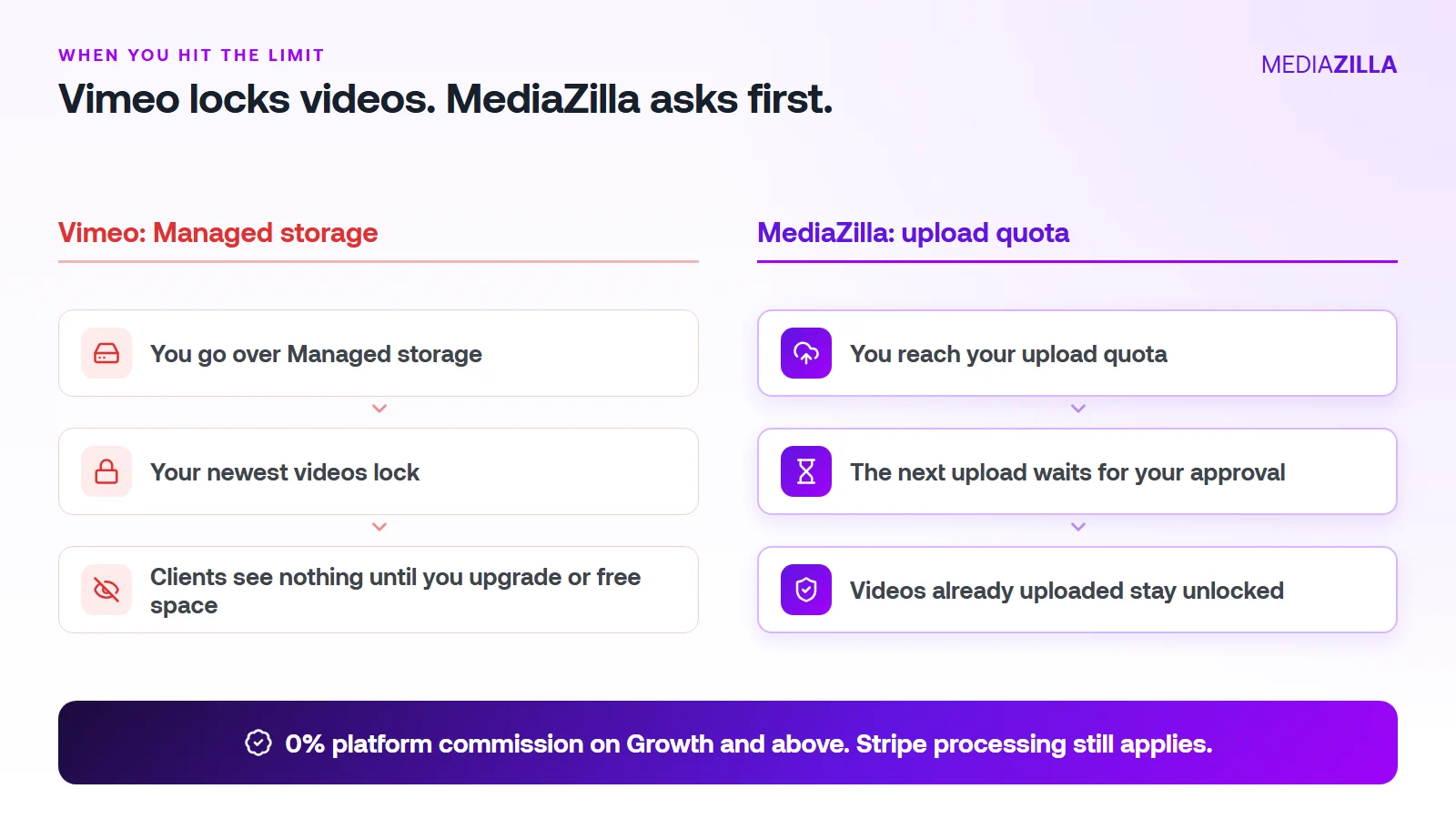
On Vimeo, going over your Managed storage locks your newest uploads. On MediaZilla, the quota limits what you upload in a year. It doesn't decide which films stay watchable.
Reach the quota and the next upload pauses until you approve extra quota or upgrade. Nothing you've already uploaded gets locked or deleted because you went over.
One thing to know. Deleting a video doesn't give quota back, and re-uploads count too. Upload what you plan to keep.
0% Platform Commission
On Growth and above, you can sell with the built-in paywall. Buyers pay into your own Stripe account and MediaZilla takes 0%. Stripe's card processing still applies, about 2.9% plus $0.30 per US card payment.
Starter and Free don't include video sales, so pick Growth or higher if selling is the point. On $12,000 in sales (300 films at $40), a 10% plus $0.50 checkout keeps $1,350. At 0% that line is $0. We break it down in zero-commission Stripe checkout.
How Does the Upload Quota Work, and Who Does It Help?
| Plan | Price (billed annually) | Upload quota | Extra upload | Seats | Sales commission |
|---|---|---|---|---|---|
| Free | $0 | 10 GB | $5/GB | 1 | Not included |
| Starter | $21/mo | 50 GB per year | $3.75/GB | 1 | Not included |
| Growth | $37/mo | 100 GB per year | $1.25/GB | 1 | 0% |
| Pro | $51/mo | 600 GB per year | $1.25/GB | 2 | 0% |
| Business | $94/mo | 1.2 TB per year | $1/GB | 5 | 0% |
You pay for what you add, at a clear per-GB rate. You don't get bumped to a bigger tier because last year's films pile up.
A worked example. Say you upload 240 GB in a year (60 films at 4 GB each, an illustration, so use your own numbers):
- Growth: $37 a month is $444 a year for 100 GB. The other 140 GB at $1.25 is $175. Total $619.
- Pro: $51 a month is $612 a year and covers 600 GB. Total $612. The better fit here.
Be honest about the other side. If you only host a few gigabytes of private video and never sell, a cheaper Vimeo plan can cost less. MediaZilla earns its price when you deliver, protect, and sell finished films.
How Is MediaZilla Different From the Others?
- Versus Vimeo: Vimeo caps what you keep and locks the overflow. Selling goes through Vimeo Streaming, which charges 10% plus $0.50 per transaction on Starter. See Vimeo vs MediaZilla.
- Versus Dacast: Dacast's paywall takes 9.9% plus $0.40 per purchase on top of the plan, and lists DRM on its $165 a month plan. See Dacast vs MediaZilla.
- Versus marketplaces: Gumroad lists 10% plus $0.50 per direct sale. You also share the buyer relationship.
- What MediaZilla adds: DRM encryption, apps for Roku, Apple TV, Fire TV, Android TV, iOS, and Android, and buyer access that survives even if you cancel your plan.
Try it before you commit. MediaZilla has a 14-day trial with no credit card. During the trial, selling runs at 15% commission, and the 0% rate starts on a paid Growth plan or higher. Start your free MediaZilla trial.
Ready to launch to your own list? Upload your film and try MediaZilla free.
Frequently Asked Questions About Email Lists for Filmmakers
Is an email list better than social media for selling a film?
How many email subscribers do I need before I launch?
Where should I collect emails?
Can I email my buyers after they purchase?
Do followers still matter?
Featured Resource
Migrate from Vimeo On Demand before November 20
Apply for a free MediaZilla migration spot. Approved libraries move in 14 days, or we pay you $1,000.
Apply for free migration