What App Stores and Marketplaces Take From a Film Sale
By MediaZillaUpdated
Free migration offer
Move your Vimeo On Demand library to MediaZilla in 14 days, or we pay you $1,000.

300 film sales at $40 is $12,000. How much reaches you depends on where the buyer clicked buy. Here are the cuts from Roku, Apple, Google Play, Gumroad, and your own checkout, and what the fee pages don't show.
You sold 300 copies of your film at $40. That is $12,000. How much of it reaches you depends almost entirely on where the buyer clicked "buy."
Apps, TV stores, marketplaces, and your own checkout all take different cuts, and some fees are easy to miss. Here are the numbers we could verify, and the ones where you need to check the source yourself.
What Are the Ways to Sell a Film?
- App stores. Apple and Google Play, where a buyer pays through the store's own billing.
- TV channel stores. Roku and similar, where the platform collects payment.
- Sales tools. Gumroad and similar, which take a percentage plus a fixed fee.
- Your own checkout. Your page, your Stripe account, a flat plan from the video platform.
What Does Each Route Take?
- Apple: its Small Business Program page lists 15% on paid apps and in-app purchases for developers with up to $1 million in proceeds the year before. The page doesn't state the standard rate, and it doesn't say whether film rentals or purchases qualify, so check Apple's terms.
- Google Play: its service fee page lists different rates by region and sale type. They include a 15% tier on the first $1 million a year in some markets and a 5% billing fee in others. The table is hard to read, so confirm yours.
- Roku: 80% to the publisher and 20% to Roku on payments collected through Roku Pay. See our Roku fee guide.
- Gumroad: lists 10% plus $0.50 per direct sale, with card processing on top.
- Stripe on your own checkout: 2.9% plus $0.30 per successful US card charge.
What Does a $12,000 Year Look Like?
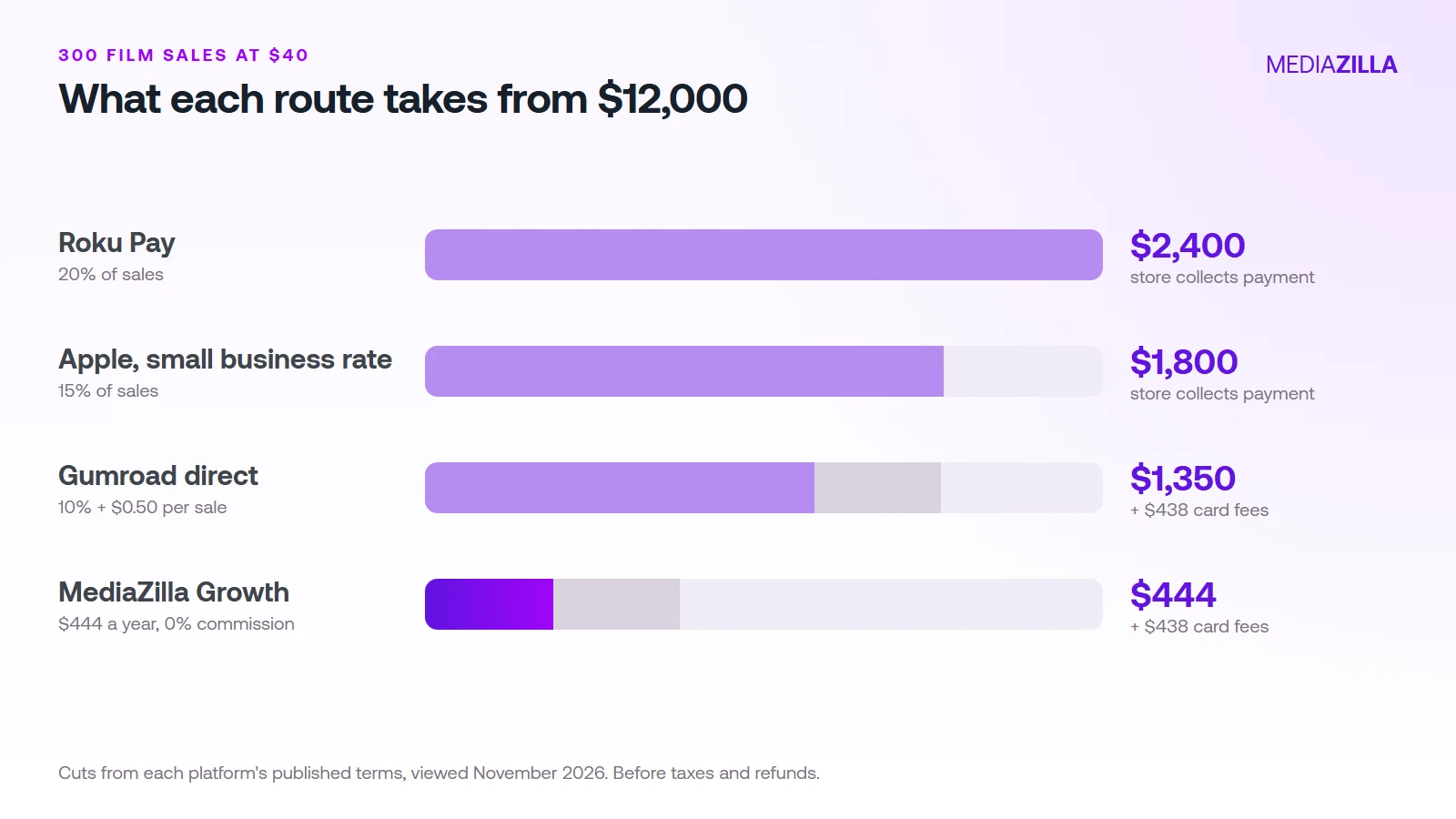
Here is the same year, 300 sales at $40, on each route. Card fees on a $40 sale are $1.46, which is $438 across 300 sales.
| Route | Platform cut | Card fees | You keep |
|---|---|---|---|
| Roku Pay | $2,400 (20%) | Collected by Roku | $9,600 |
| Apple, small business rate | $1,800 (15%) | Collected by Apple | $10,200 |
| Gumroad direct | $1,350 | $438 | $10,212 |
| MediaZilla Growth | $444 a year, 0% commission | $438 | $11,118 |
These are our numbers, before taxes and refunds. For Roku and Apple, the store collects the payment, so we haven't added card fees on top. Check each store's payout terms for what it deducts. For the full math on percentage fees, read why a 9.9% paywall fee really costs 21% to 31%.
What Do the Fee Pages Not Show?
- Who owns the customer. A store buyer usually belongs to the store. On your own checkout you get the email and can sell the next film.
- Eligibility. Reduced rates often depend on yearly proceeds or program rules.
- Fixed fees. A $0.30 or $0.50 fee matters more on a $5 rental than a $40 film.
- Refund rules. Who handles a refund, and whether the fee comes back.
How Do You Choose?
- Decide where your buyers are. If your audience finds you through social posts and email, your own page works. If buyers browse a TV store, a store listing can pay for itself.
- Price in the platform's fee. Work backwards from what you want to keep per sale.
- Test one route first. Run a small launch, then compare real payouts to this table.
Our guide to selling a film online and the Stripe checkout guide cover the direct route step by step.
How Does MediaZilla Solve This?
MediaZilla is the direct route. You sell through your own checkout at 0% platform commission on Growth and above, and card processing goes to your own Stripe account. Here is how the rest works.
Your Videos Aren't Locked or Deleted
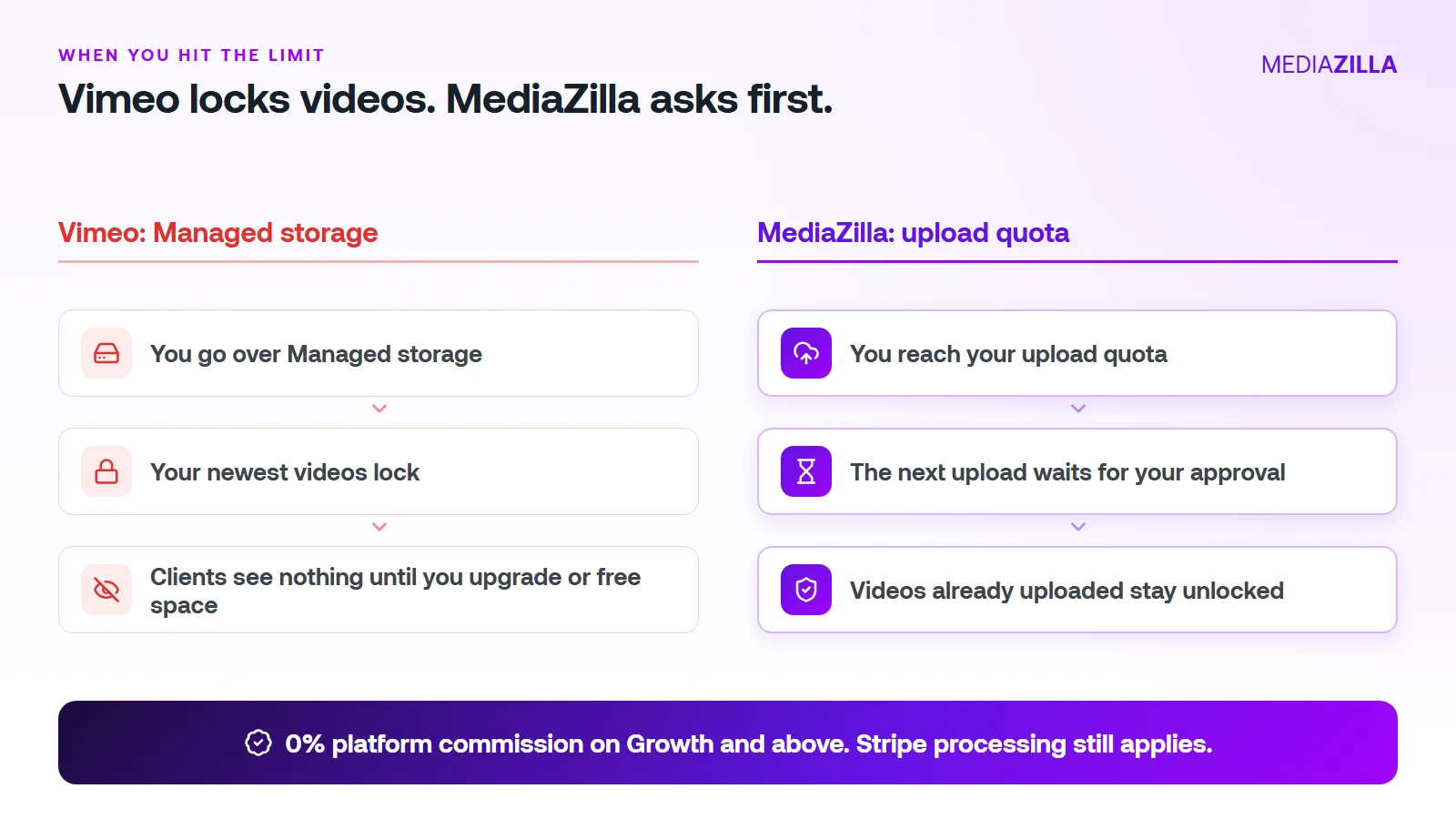
On Vimeo, going over your Managed storage locks your newest uploads. On MediaZilla, the quota limits what you upload in a year. It doesn't decide which films stay watchable.
Reach the quota and the next upload pauses until you approve extra quota or upgrade. Nothing you've already uploaded gets locked or deleted because you went over.
One thing to know. Deleting a video doesn't give quota back, and re-uploads count too. Upload what you plan to keep.
0% Platform Commission
On Growth and above, you can sell with the built-in paywall. Buyers pay into your own Stripe account and MediaZilla takes 0%. Stripe's card processing still applies, about 2.9% plus $0.30 per US card payment.
Starter and Free don't include video sales, so pick Growth or higher if selling is the point. On $12,000 in sales (300 films at $40), a 10% plus $0.50 checkout keeps $1,350. At 0% that line is $0. We break it down in zero-commission Stripe checkout.
How Does the Upload Quota Work, and Who Does It Help?
| Plan | Price (billed annually) | Upload quota | Extra upload | Seats | Sales commission |
|---|---|---|---|---|---|
| Free | $0 | 10 GB | $5/GB | 1 | Not included |
| Starter | $21/mo | 50 GB per year | $3.75/GB | 1 | Not included |
| Growth | $37/mo | 100 GB per year | $1.25/GB | 1 | 0% |
| Pro | $51/mo | 600 GB per year | $1.25/GB | 2 | 0% |
| Business | $94/mo | 1.2 TB per year | $1/GB | 5 | 0% |
You pay for what you add, at a clear per-GB rate. You don't get bumped to a bigger tier because last year's films pile up.
A worked example. Say you upload 240 GB in a year (60 films at 4 GB each, an illustration, so use your own numbers):
- Growth: $37 a month is $444 a year for 100 GB. The other 140 GB at $1.25 is $175. Total $619.
- Pro: $51 a month is $612 a year and covers 600 GB. Total $612. The better fit here.
Be honest about the other side. If you only host a few gigabytes of private video and never sell, a cheaper Vimeo plan can cost less. MediaZilla earns its price when you deliver, protect, and sell finished films.
How Is MediaZilla Different From the Others?
- Versus Vimeo: Vimeo caps what you keep and locks the overflow. Selling goes through Vimeo Streaming, which charges 10% plus $0.50 per transaction on Starter. See Vimeo vs MediaZilla.
- Versus Dacast: Dacast's paywall takes 9.9% plus $0.40 per purchase on top of the plan, and lists DRM on its $165 a month plan. See Dacast vs MediaZilla.
- Versus marketplaces: Gumroad lists 10% plus $0.50 per direct sale. You also share the buyer relationship.
- What MediaZilla adds: DRM encryption, apps for Roku, Apple TV, Fire TV, Android TV, iOS, and Android, and buyer access that survives even if you cancel your plan.
Try it before you commit. MediaZilla has a 14-day trial with no credit card. During the trial, selling runs at 15% commission, and the 0% rate starts on a paid Growth plan or higher. Start your free MediaZilla trial.
Want to see your own numbers? Upload one film and try MediaZilla free.
Frequently Asked Questions About Platform Fees on Film Sales
How much does Apple take when I sell a film through an app?
How much does Google Play take?
What does Roku take?
Do I still pay card fees if I sell on my own checkout?
Is selling direct always better than a store?
Featured Resource
Migrate from Vimeo On Demand before November 20
Apply for a free MediaZilla migration spot. Approved libraries move in 14 days, or we pay you $1,000.
Apply for free migration