Wistia Pricing 2026: What Changed and What It Really Costs Filmmakers
By MediaZillaUpdated
Free migration offer
Move your Vimeo On Demand library to MediaZilla in 14 days, or we pay you $1,000.

Wistia moved from per-video plans to storage-based plans on March 17, 2026. Here is what the current pricing page says, how storage blocks and extra seats add up, and what three kinds of filmmakers would pay in a year.
Wistia stopped charging per video and started charging by storage. Wistia says it introduced new plans and pricing on March 17, 2026. If you search for Wistia pricing today, you will still find old plan names on many sites, which is why the numbers look so inconsistent.
Here is what the current pricing page actually says, how storage billing works, and what three kinds of filmmakers would pay in a year. Every figure comes from Wistia's own pages unless we say it is our math.
What Changed on March 17, 2026?
Wistia's legacy plans article says legacy plans are plans you signed up for before March 17, 2026, if you haven't moved to a new one. In its words, the plan you're on is no longer available to new customers.
- Some legacy plans will be retired, and account owners will be notified in advance.
- If you take no action, your account may be moved to the closest equivalent plan that fits your usage.
- Monthly subscribers move on their monthly billing date, and annual subscribers move on their renewal date.
- The first invoice after the move may include one final charge for media usage before the change. After that, the extra per-media charges should stop.
The old model charged extra for media over a plan's limit. The new one limits storage instead. That matters if you have a large library of long films, because a few big files now count more than a hundred small ones.
What Do the Current Plans Cost?
These are the plans on Wistia's pricing page. Paid plans are shown at annual billing, and the page says "Save 20%" without listing a monthly rate.
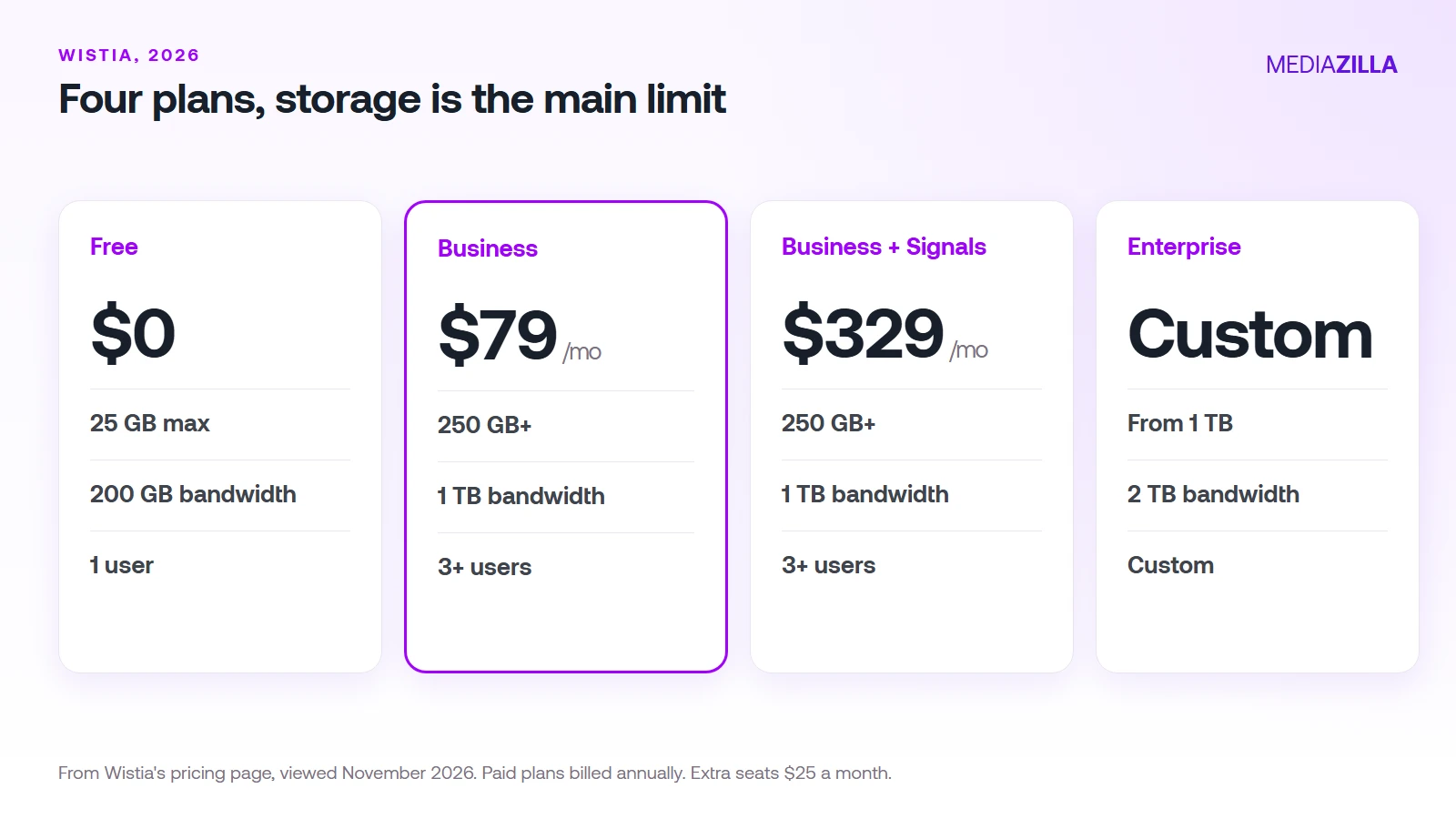
| Plan | Price | Storage | Bandwidth | Users |
|---|---|---|---|---|
| Free | $0 | 25 GB max | 200 GB | 1 |
| Business | $79 a month | 250 GB+ | 1 TB | 3+ ($25 each extra) |
| Business + Signals | $329 a month | 250 GB+ | 1 TB | 3+ ($25 each extra) |
| Enterprise | Custom | From 1 TB | 2 TB | Custom |
Free keeps Wistia branding on the player. Removing it starts on Business. Business + Signals adds marketing automation integrations and lead data, which are built for sales and marketing teams. Enterprise adds SSO and what Wistia calls Video Playback Protection.
How Does Storage Billing Work?
Wistia's storage limits article explains the rules filmmakers should know:
- Every file counts. Video, audio, documents, and images, in both shared and personal libraries.
- Copies count. Saving a copy of a video, including through the editor, adds a new file.
- Archived media still counts. To free space you must permanently delete it.
- Storage is measured on your monthly billing date, even on annual plans.
- Going over adds a block. On a paid plan, Wistia adds the smallest block that covers the overage for that billing cycle. Free plans can't go over.
The block prices Wistia lists are:
| Block | Monthly billing | Annual billing, per month |
|---|---|---|
| 100 GB | $15 | $12 |
| 250 GB | $31.25 | $25 |
| 1 TB | $93.75 | $75 |
What Would Three Filmmakers Pay?
These are our calculations from the prices above. They assume annual billing and don't include taxes or any add-ons.
- A solo editor with a 3-person team and 200 GB of films. Business at $79 a month is $948 a year, and 200 GB fits in the 250 GB included.
- A studio with 5 people and 500 GB. Business is $948. Two extra seats at $25 a month add $600. A 250 GB block at $25 a month adds $300. The total is $1,848 a year.
- A solo creator with 20 GB. Free is $0, with Wistia branding on the player.
Seats and storage grow the bill quickly. Our Wistia vs MediaZilla comparison walks through the same plan against a flat film platform.
What Is Not on the Pricing Page?
- A paywall or checkout. The page doesn't describe one. Wistia's own guide says the player has no built-in paywall. See can you sell films on Wistia.
- DRM. Video Playback Protection appears only on Enterprise, and the page doesn't describe it as DRM. Ask Wistia what it covers.
- A monthly price. Only annual prices are shown for paid plans.
- Per-GB storage rates. Wistia lists block prices, not a per-GB rate.
Who Should Stay on Wistia?
Wistia is strong for marketing teams. Its analytics, player, and CRM integrations are why it is popular. If your videos are demos and landing-page content and your storage fits Business, the pricing is clear and reasonable. It is a harder fit if your product is a finished film that buyers pay to watch.
How Does MediaZilla Solve This?
MediaZilla prices by yearly upload quota, not stored gigabytes, so the numbers are not a direct match. A film business pays a flat plan, with 0% platform commission on Growth and above and a checkout built in. Here is how the rest works.
Your Videos Aren't Locked or Deleted
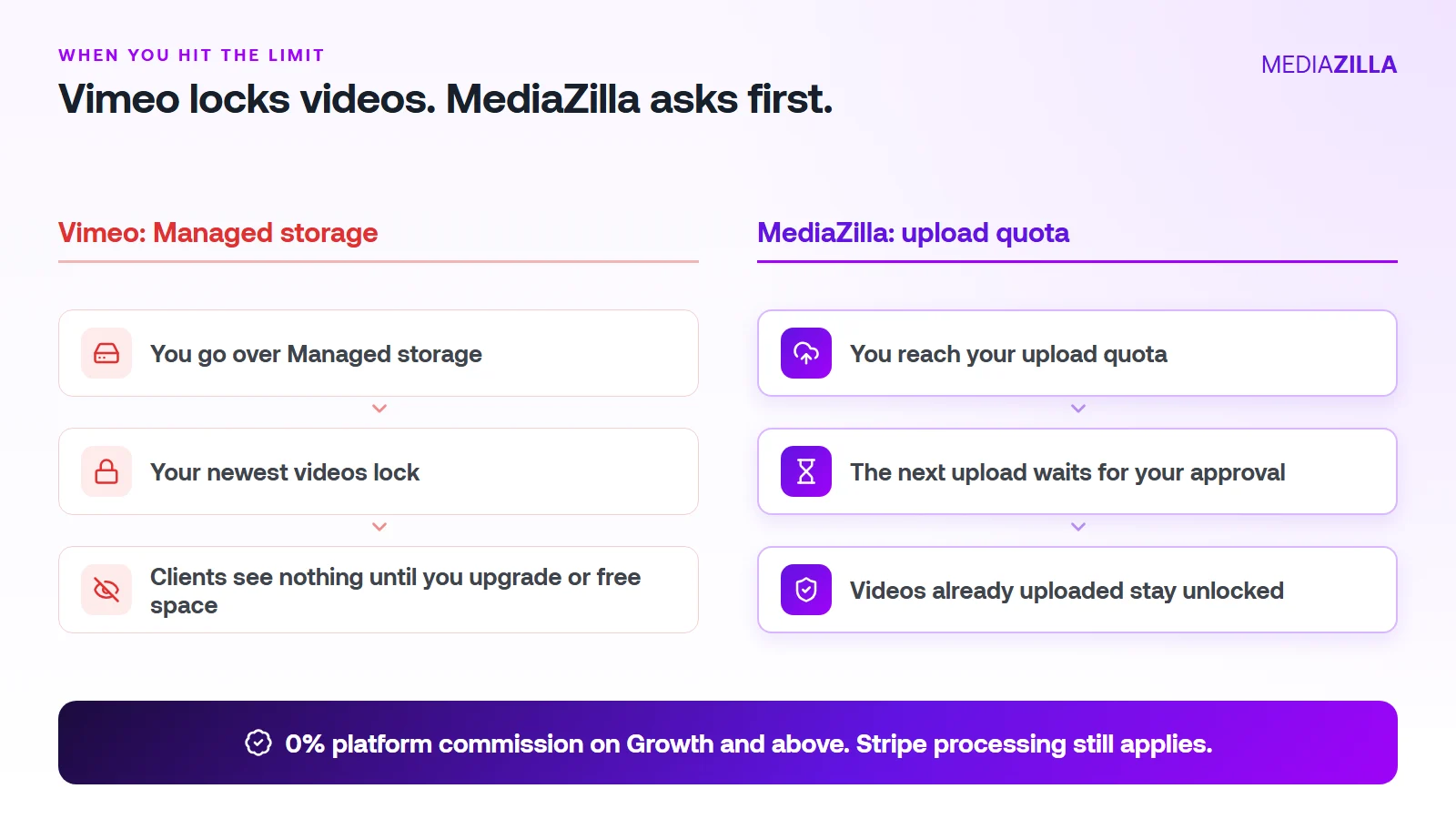
On Vimeo, going over your Managed storage locks your newest uploads. On MediaZilla, the quota limits what you upload in a year. It doesn't decide which films stay watchable.
Reach the quota and the next upload pauses until you approve extra quota or upgrade. Nothing you've already uploaded gets locked or deleted because you went over.
One thing to know. Deleting a video doesn't give quota back, and re-uploads count too. Upload what you plan to keep.
0% Platform Commission
On Growth and above, you can sell with the built-in paywall. Buyers pay into your own Stripe account and MediaZilla takes 0%. Stripe's card processing still applies, about 2.9% plus $0.30 per US card payment.
Starter and Free don't include video sales, so pick Growth or higher if selling is the point. On $12,000 in sales (300 films at $40), a 10% plus $0.50 checkout keeps $1,350. At 0% that line is $0. We break it down in zero-commission Stripe checkout.
How Does the Upload Quota Work, and Who Does It Help?
| Plan | Price (billed annually) | Upload quota | Extra upload | Seats | Sales commission |
|---|---|---|---|---|---|
| Free | $0 | 10 GB | $5/GB | 1 | Not included |
| Starter | $21/mo | 50 GB per year | $3.75/GB | 1 | Not included |
| Growth | $37/mo | 100 GB per year | $1.25/GB | 1 | 0% |
| Pro | $51/mo | 600 GB per year | $1.25/GB | 2 | 0% |
| Business | $94/mo | 1.2 TB per year | $1/GB | 5 | 0% |
You pay for what you add, at a clear per-GB rate. You don't get bumped to a bigger tier because last year's films pile up.
A worked example. Say you upload 240 GB in a year (60 films at 4 GB each, an illustration, so use your own numbers):
- Growth: $37 a month is $444 a year for 100 GB. The other 140 GB at $1.25 is $175. Total $619.
- Pro: $51 a month is $612 a year and covers 600 GB. Total $612. The better fit here.
Be honest about the other side. If you only host a few gigabytes of private video and never sell, a cheaper Vimeo plan can cost less. MediaZilla earns its price when you deliver, protect, and sell finished films.
How Is MediaZilla Different From the Others?
- Versus Vimeo: Vimeo caps what you keep and locks the overflow. Selling goes through Vimeo Streaming, which charges 10% plus $0.50 per transaction on Starter. See Vimeo vs MediaZilla.
- Versus Dacast: Dacast's paywall takes 9.9% plus $0.40 per purchase on top of the plan, and lists DRM on its $165 a month plan. See Dacast vs MediaZilla.
- Versus marketplaces: Gumroad lists 10% plus $0.50 per direct sale. You also share the buyer relationship.
- What MediaZilla adds: DRM encryption, apps for Roku, Apple TV, Fire TV, Android TV, iOS, and Android, and buyer access that survives even if you cancel your plan.
Try it before you commit. MediaZilla has a 14-day trial with no credit card. During the trial, selling runs at 15% commission, and the 0% rate starts on a paid Growth plan or higher. Start your free MediaZilla trial.
Comparing your own bill? Upload one film and try MediaZilla free.
Frequently Asked Questions About Wistia Pricing
What changed in Wistia pricing in 2026?
How much does Wistia cost in 2026?
What counts toward Wistia storage?
What happens if I go over my Wistia storage?
What happens to my old Wistia plan?
Featured Resource
Migrate from Vimeo On Demand before November 20
Apply for a free MediaZilla migration spot. Approved libraries move in 14 days, or we pay you $1,000.
Apply for free migration