Vimeo's Embeddable Setting Can Eat Your Storage: How to Check Every Video
By MediaZillaUpdated
Free migration offer
Move your Vimeo On Demand library to MediaZilla in 14 days, or we pay you $1,000.

A Vimeo video you never embedded can still count against your Managed storage if it is set to Embeddable. Here is the exact rule, a 20-minute audit, and what to do if you are over the limit.
A video you never embedded can still use up your storage. If it is set to Embeddable on Vimeo, it counts. That one setting decides whether your showreel is free or not.
Vimeo's 2026 plans make public video free, but only a narrow kind of public video. Here is the exact rule, how to audit your library in about 20 minutes, and what to do if you are over the limit.
What Is Vimeo's Embeddable Rule?
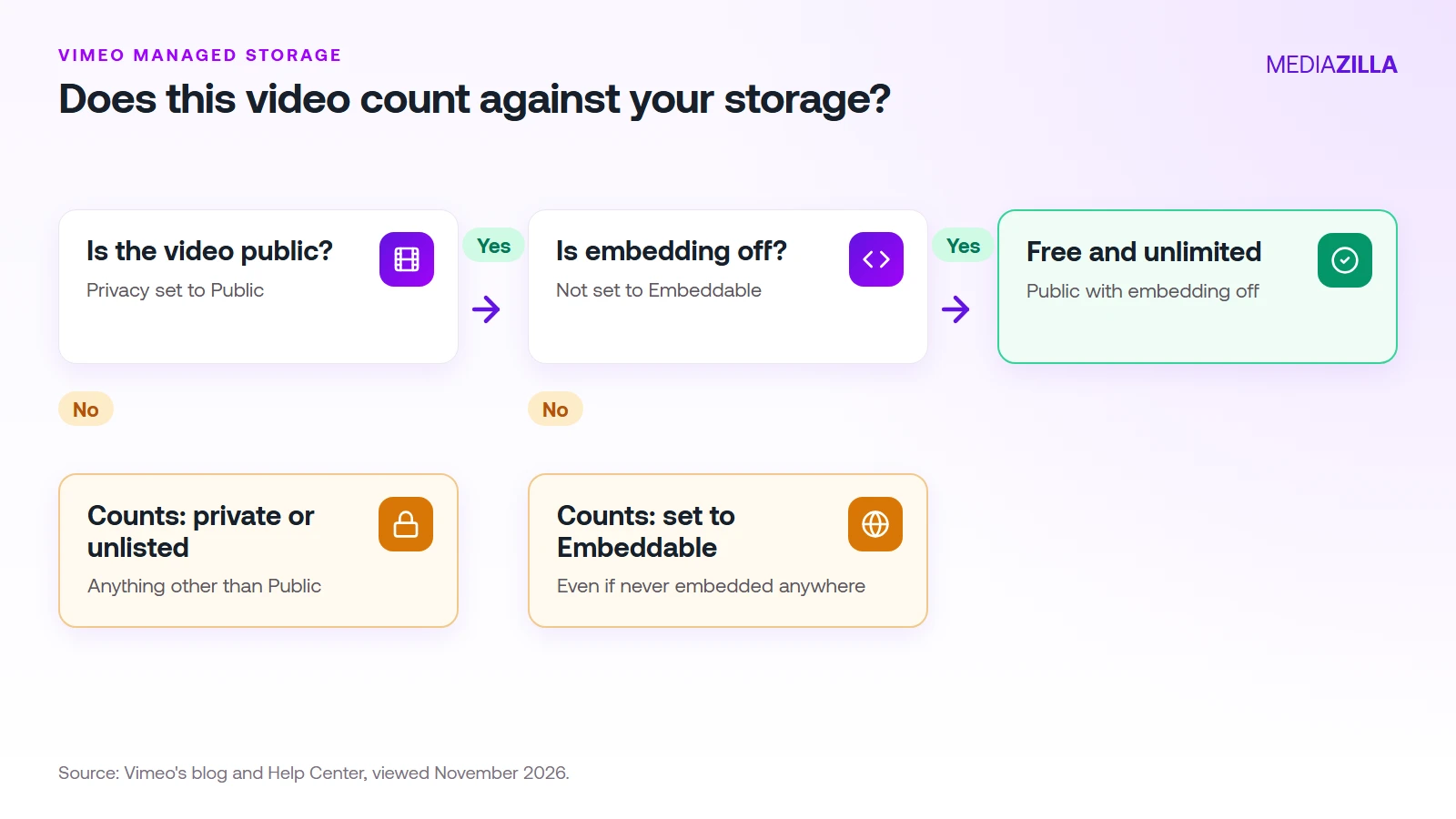
Vimeo's plans now differ by Managed storage, and Vimeo's own blog says only videos that are non-public or embeddable count toward it. Two things put a video in Managed storage:
- Its privacy is anything other than Public, such as private or unlisted.
- It is set to Embeddable, even if it isn't embedded anywhere.
Only a video that is public and not embeddable is free and unlimited. Vimeo's Help Center lists the allowances:
| Plan | Managed storage | About how many 4 GB films |
|---|---|---|
| Free | 3 GB | Less than one |
| Creator | 50 GB | 12 |
| Core | 500 GB | 125 |
| Professional | 7 TB | 1,750 |
| Studio | 10 TB | 2,500 |
Why Is Embeddable the Trap?
Because it is the default way most people use Vimeo. You upload a film, paste an embed code on a client page or your portfolio, and move on. That film is now in Managed storage.
It also works the other way. A showreel that is public with embedding turned off is free, but viewers watch it on Vimeo's page. The moment you want it playing on your own website, it has to be embeddable, and it counts. A showreel embedded on your site counts like any other film.
Going over the limit has consequences. Vimeo says some videos get locked until you free up space or upgrade, and that locked videos are never deleted. Vimeo says they stay downloadable for six months. A locked video can't be played or embedded, so a client page can break the same day.
How Do You Audit Your Library in 20 Minutes?
- List every video with its size. Use your library view and write down any film over 1 GB.
- Mark each one Public, Private, or Unlisted. Anything not Public counts.
- Check the embed setting on every public video. Look in each video's privacy settings. Vimeo's menu wording can change, so follow Vimeo's help pages for the exact steps.
- Add up the counted sizes. Compare the total with your plan's Managed storage.
- Check your Billing page. Confirm which plan and storage Vimeo shows for your account.
How Much Storage Will You Actually Use?
Here is a small example. A wedding filmmaker keeps 20 delivered films at 4 GB each on private links, plus 5 showreels at 3 GB each embedded on their website.
- 20 films × 4 GB = 80 GB
- 5 showreels × 3 GB = 15 GB
- Total counted: 95 GB
That is far past Creator's 50 GB and well within Core's 500 GB. Core is $24.50 a month on annual billing, or $294 a year. Add a busy season of 60 more films and the total reaches 335 GB, still under Core. The numbers are our math, so run your own.
If you move from an old plan to Core automatically, you may get 2 TB. Vimeo says that allowance does not carry over to a different Core subscription, so don't plan around it if you change plans. Our plan-mapping guide shows where each old plan lands.
What Are Your Options?
- Turn embedding off on public videos you don't need on your own site.
- Archive the old ones. Download masters for finished jobs and remove the Vimeo copy.
- Pick the plan that fits. Our every-plan guide lists the prices.
- Move delivery elsewhere. If most of your counted storage is client films, a platform built for delivery can cost less. See how to cancel Vimeo without losing videos.
How Does MediaZilla Solve This?
On Vimeo, a setting you may not remember changing decides what counts. On MediaZilla the limit is an upload quota you can see, and your films are not locked or deleted when you pass it. Here is how the rest works.
Your Videos Aren't Locked or Deleted
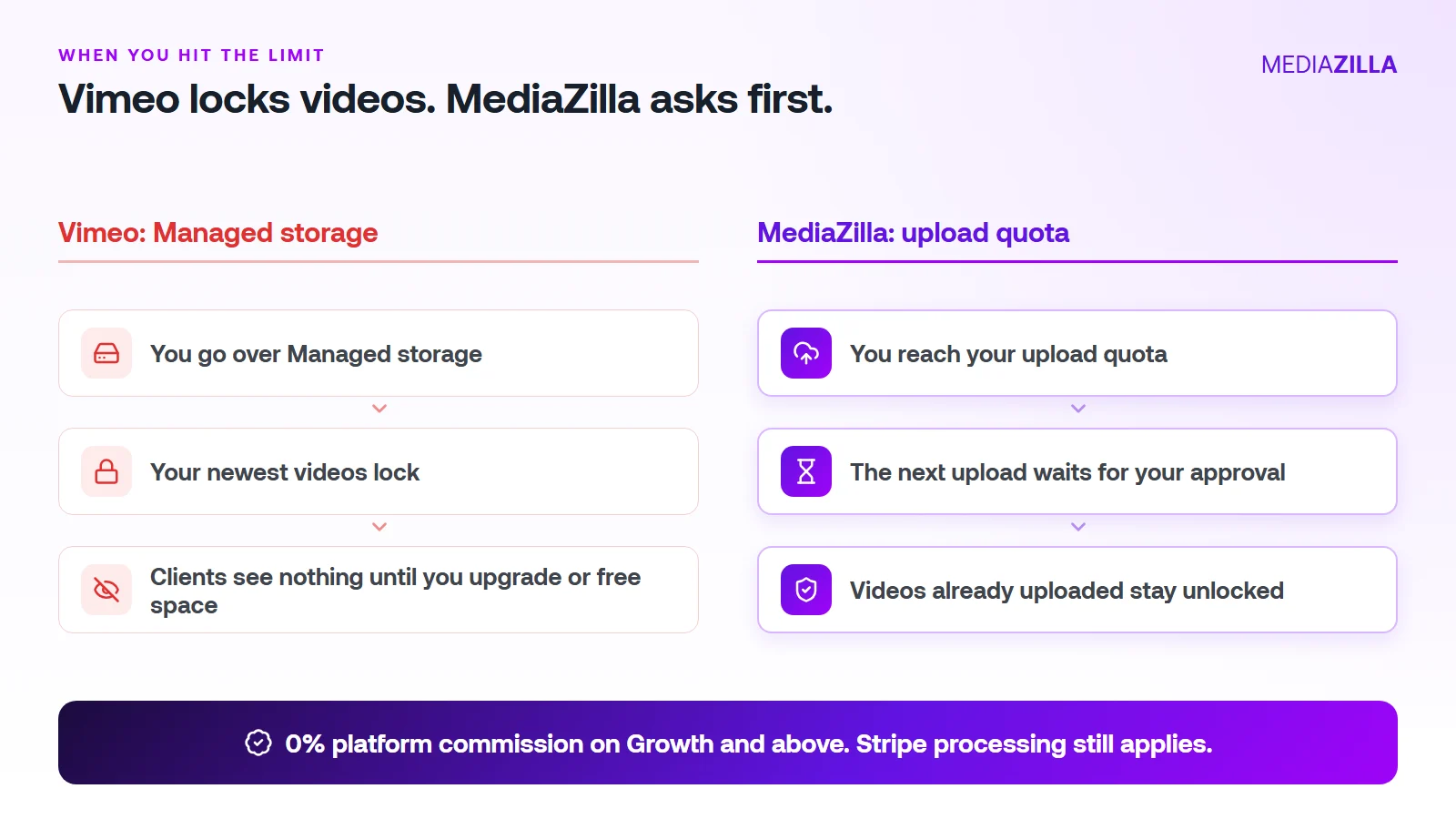
On Vimeo, going over your Managed storage locks your newest uploads. On MediaZilla, the quota limits what you upload in a year. It doesn't decide which films stay watchable.
Reach the quota and the next upload pauses until you approve extra quota or upgrade. Nothing you've already uploaded gets locked or deleted because you went over.
One thing to know. Deleting a video doesn't give quota back, and re-uploads count too. Upload what you plan to keep.
0% Platform Commission
On Growth and above, you can sell with the built-in paywall. Buyers pay into your own Stripe account and MediaZilla takes 0%. Stripe's card processing still applies, about 2.9% plus $0.30 per US card payment.
Starter and Free don't include video sales, so pick Growth or higher if selling is the point. On $12,000 in sales (300 films at $40), a 10% plus $0.50 checkout keeps $1,350. At 0% that line is $0. We break it down in zero-commission Stripe checkout.
How Does the Upload Quota Work, and Who Does It Help?
| Plan | Price (billed annually) | Upload quota | Extra upload | Seats | Sales commission |
|---|---|---|---|---|---|
| Free | $0 | 10 GB | $5/GB | 1 | Not included |
| Starter | $21/mo | 50 GB per year | $3.75/GB | 1 | Not included |
| Growth | $37/mo | 100 GB per year | $1.25/GB | 1 | 0% |
| Pro | $51/mo | 600 GB per year | $1.25/GB | 2 | 0% |
| Business | $94/mo | 1.2 TB per year | $1/GB | 5 | 0% |
You pay for what you add, at a clear per-GB rate. You don't get bumped to a bigger tier because last year's films pile up.
A worked example. Say you upload 240 GB in a year (60 films at 4 GB each, an illustration, so use your own numbers):
- Growth: $37 a month is $444 a year for 100 GB. The other 140 GB at $1.25 is $175. Total $619.
- Pro: $51 a month is $612 a year and covers 600 GB. Total $612. The better fit here.
Be honest about the other side. If you only host a few gigabytes of private video and never sell, a cheaper Vimeo plan can cost less. MediaZilla earns its price when you deliver, protect, and sell finished films.
How Is MediaZilla Different From the Others?
- Versus Vimeo: Vimeo caps what you keep and locks the overflow. Selling goes through Vimeo Streaming, which charges 10% plus $0.50 per transaction on Starter. See Vimeo vs MediaZilla.
- Versus Dacast: Dacast's paywall takes 9.9% plus $0.40 per purchase on top of the plan, and lists DRM on its $165 a month plan. See Dacast vs MediaZilla.
- Versus marketplaces: Gumroad lists 10% plus $0.50 per direct sale. You also share the buyer relationship.
- What MediaZilla adds: DRM encryption, apps for Roku, Apple TV, Fire TV, Android TV, iOS, and Android, and buyer access that survives even if you cancel your plan.
Try it before you commit. MediaZilla has a 14-day trial with no credit card. During the trial, selling runs at 15% commission, and the 0% rate starts on a paid Growth plan or higher. Start your free MediaZilla trial.
Want to test it? Upload one film and try MediaZilla free.
Frequently Asked Questions About Vimeo's Embeddable Setting
Do public Vimeo videos count against Managed storage?
Does a video count if I never embedded it anywhere?
How much Managed storage does each Vimeo plan include?
What happens if my videos exceed the limit?
Can I keep a showreel on my website without it counting?
Featured Resource
Migrate from Vimeo On Demand before November 20
Apply for a free MediaZilla migration spot. Approved libraries move in 14 days, or we pay you $1,000.
Apply for free migration