How to Protect a Film From Piracy: Password, Watermark, or DRM?
By MediaZillaUpdated
Free migration offer
Move your Vimeo On Demand library to MediaZilla in 14 days, or we pay you $1,000.

No protection is perfect. Here is what a password, a viewer login, DRM, and a forensic watermark each stop, what each one misses, and how to match them to client delivery, festival screeners, and paid films.
No protection is perfect. Not a password, not DRM, not a watermark. Each one stops a different kind of copying, and each one has a gap.
The useful question is not "how do I make piracy impossible?" It is "which leaks can I realistically stop, and which can I trace?" Here is how the layers work, what each one misses, and how to match them to your film.
What Are the Layers of Film Protection?
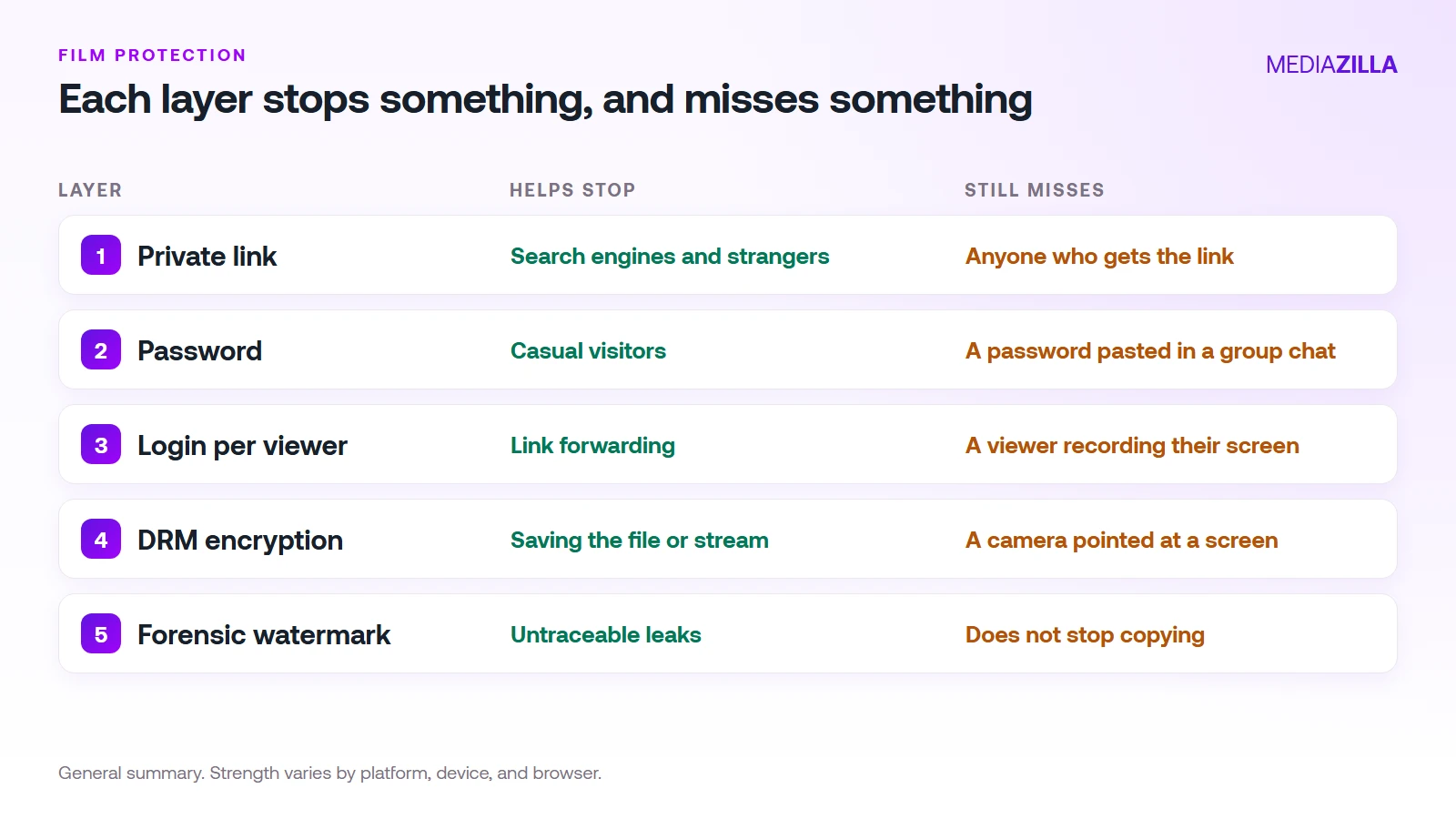
Think of protection as a ladder. Each rung stops more, and each one costs more effort or money:
- A private or unlisted link
- A password on the link
- A login for every viewer
- DRM encryption of the video itself
- A watermark that traces a leak to a viewer
Does a Password Protect Your Film?
It protects against strangers, not against buyers. A link and its password can be pasted into a group chat in seconds. Once that happens you can't tell paying viewers from guests. Our piracy cost guide walks through the dance-recital version of this, where one shared link reaches dozens of families.
A login per viewer is a real step up, because access belongs to an account instead of a link. It still doesn't stop someone recording the screen.
What Does DRM Do and Not Do?
DRM encrypts the video. A device needs a valid license to decrypt and play it, so saving the file or copying a stream URL gives a thief nothing playable. Streaming hosts such as Brightcove describe DRM as controlling playback on supported devices.
The limits matter as much as the benefit:
- Strength varies. Vendor sources describe stronger hardware-backed protection on some devices and browsers than on others, and they disagree on details. Treat any platform's "screen recording blocked" claim as device dependent.
- The analog gap. Every source we read treats a camera pointed at a screen as something DRM cannot stop.
- It protects the file, not the person. A legitimate viewer can still leak what they watch.
We explain how MediaZilla approaches protection, including DRM and secure delivery, in how MediaZilla protects film content.
Where Does Watermarking Fit?
Watermarking doesn't prevent copying. It makes a leak traceable. A mark added to each viewer's copy lets you see which account a leaked file came from. Vendors commonly pair it with DRM for exactly that reason: the goal is that casual recording fails and a successful leak can be traced.
If you need this, ask the platform directly whether it offers per-viewer watermarking. Don't assume it is included.
Which Protection Matches Your Situation?
- Client delivery: a private link or a login is usually enough. The client already has the right to the film.
- Festival screener: a password and downloads off. See our festival screener guide.
- Paid films you sell: a login per buyer plus DRM, because the film is your income.
- Unreleased or high-value work: DRM plus watermarking, and a short list of viewers.
What Should You Check on Any Platform?
- Is the file encrypted, or only the page? A protected page with an open video file is not DRM.
- Is access tied to an account? Or to a link anyone can forward?
- Can you download the original? Turn it off where you can.
- Can you revoke one viewer? Without breaking everyone else's access.
- Is protection on every plan? Read the plan page, not the marketing page.
How Does MediaZilla Solve This?
MediaZilla is built for films you deliver and sell, with access tied to viewer accounts. The details of its DRM and secure delivery are in the protection guide linked above. Here is how the rest works.
Your Videos Aren't Locked or Deleted
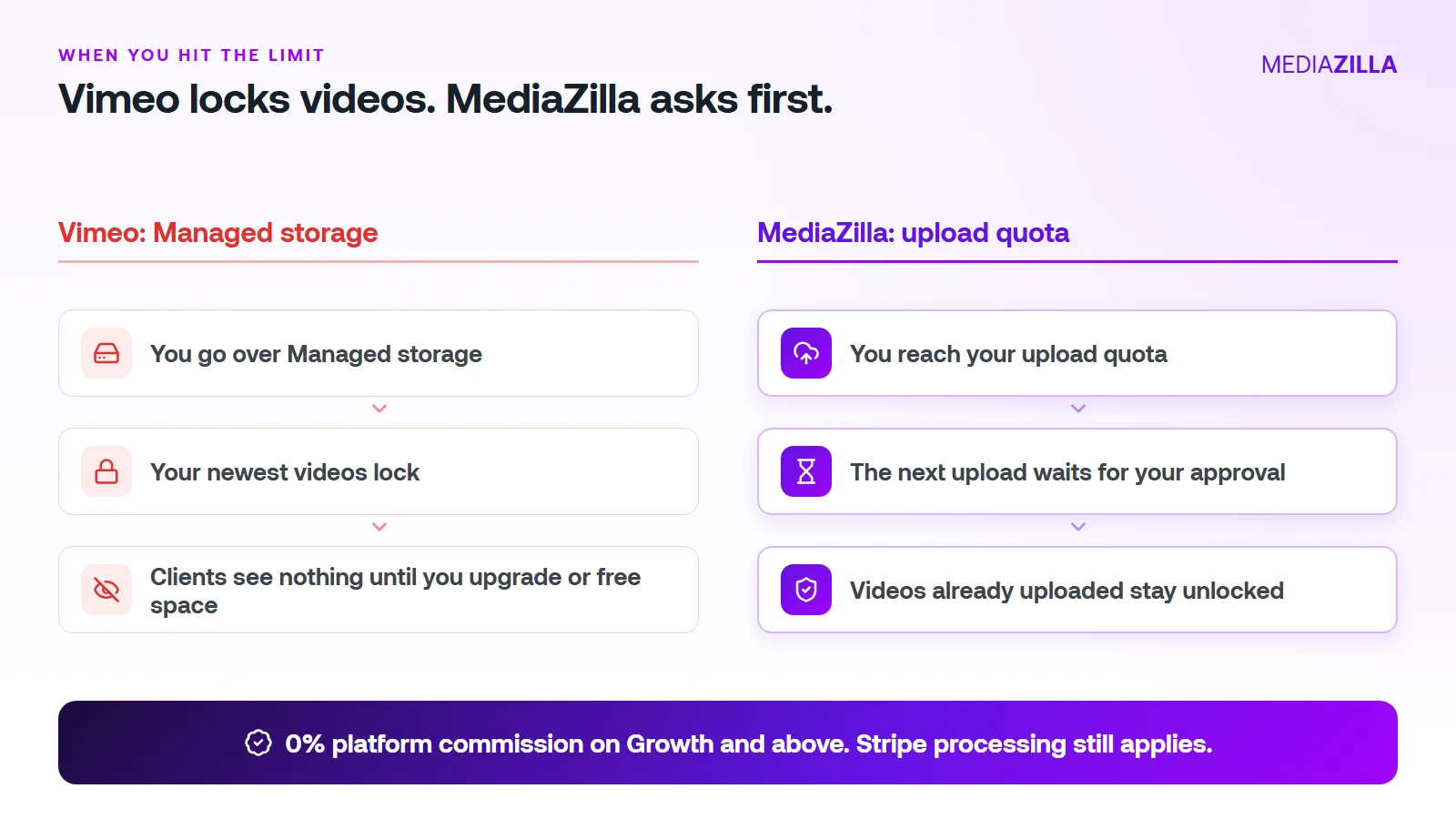
On Vimeo, going over your Managed storage locks your newest uploads. On MediaZilla, the quota limits what you upload in a year. It doesn't decide which films stay watchable.
Reach the quota and the next upload pauses until you approve extra quota or upgrade. Nothing you've already uploaded gets locked or deleted because you went over.
One thing to know. Deleting a video doesn't give quota back, and re-uploads count too. Upload what you plan to keep.
0% Platform Commission
On Growth and above, you can sell with the built-in paywall. Buyers pay into your own Stripe account and MediaZilla takes 0%. Stripe's card processing still applies, about 2.9% plus $0.30 per US card payment.
Starter and Free don't include video sales, so pick Growth or higher if selling is the point. On $12,000 in sales (300 films at $40), a 10% plus $0.50 checkout keeps $1,350. At 0% that line is $0. We break it down in zero-commission Stripe checkout.
How Does the Upload Quota Work, and Who Does It Help?
| Plan | Price (billed annually) | Upload quota | Extra upload | Seats | Sales commission |
|---|---|---|---|---|---|
| Free | $0 | 10 GB | $5/GB | 1 | Not included |
| Starter | $21/mo | 50 GB per year | $3.75/GB | 1 | Not included |
| Growth | $37/mo | 100 GB per year | $1.25/GB | 1 | 0% |
| Pro | $51/mo | 600 GB per year | $1.25/GB | 2 | 0% |
| Business | $94/mo | 1.2 TB per year | $1/GB | 5 | 0% |
You pay for what you add, at a clear per-GB rate. You don't get bumped to a bigger tier because last year's films pile up.
A worked example. Say you upload 240 GB in a year (60 films at 4 GB each, an illustration, so use your own numbers):
- Growth: $37 a month is $444 a year for 100 GB. The other 140 GB at $1.25 is $175. Total $619.
- Pro: $51 a month is $612 a year and covers 600 GB. Total $612. The better fit here.
Be honest about the other side. If you only host a few gigabytes of private video and never sell, a cheaper Vimeo plan can cost less. MediaZilla earns its price when you deliver, protect, and sell finished films.
How Is MediaZilla Different From the Others?
- Versus Vimeo: Vimeo caps what you keep and locks the overflow. Selling goes through Vimeo Streaming, which charges 10% plus $0.50 per transaction on Starter. See Vimeo vs MediaZilla.
- Versus Dacast: Dacast's paywall takes 9.9% plus $0.40 per purchase on top of the plan, and lists DRM on its $165 a month plan. See Dacast vs MediaZilla.
- Versus marketplaces: Gumroad lists 10% plus $0.50 per direct sale. You also share the buyer relationship.
- What MediaZilla adds: DRM encryption, apps for Roku, Apple TV, Fire TV, Android TV, iOS, and Android, and buyer access that survives even if you cancel your plan.
Try it before you commit. MediaZilla has a 14-day trial with no credit card. During the trial, selling runs at 15% commission, and the 0% rate starts on a paid Growth plan or higher. Start your free MediaZilla trial.
Want to see it with your own film? Upload one and try MediaZilla free.
Frequently Asked Questions About Protecting a Film
Is a password enough to protect my film?
What does DRM actually do?
Can anything stop someone filming their screen with a phone?
What is a forensic watermark?
Should I protect a free promo trailer?
Featured Resource
Migrate from Vimeo On Demand before November 20
Apply for a free MediaZilla migration spot. Approved libraries move in 14 days, or we pay you $1,000.
Apply for free migration