Vimeo On Demand Ends Nov 20: Your 21-Day Migration Plan
By MediaZillaUpdated
Moving from Vimeo On Demand
Move your films and give past buyers their access back before November 20.
21 days. That is what is left before Vimeo On Demand storefronts and viewer access end on November 20, and new sales have been dead since September 21. Here is the day-by-day plan to back up your films, export buyers, set up a new platform, and keep your customers.
21 days.That's what separates you from November 20, when Vimeo On Demand storefronts and viewer access end. New sales have been dead since September 21.
If you sell $12,000a year in films there, that income is already at $0 and the buyers go next. Here's a day-by-day plan to move your library and your customers before the door closes.
What Do You Actually Have Left?
Two dates matter. We covered both in the Vimeo On Demand key dates and deadlines.
- September 21, 2026. New purchases and subscriptions stopped. Already past.
- November 20, 2026. Storefronts go offline. Buyers lose streaming access.
One clarification, because it confuses people. The product ending is Vimeo On Demand. Vimeo OTT is a different product, and Vimeo itself keeps running. Our Vimeo OTT comparison covers whether it's the right landing spot.
What Do You Secure on Day One?
Before you compare platforms, protect what you can't rebuild. Four things. In this order.
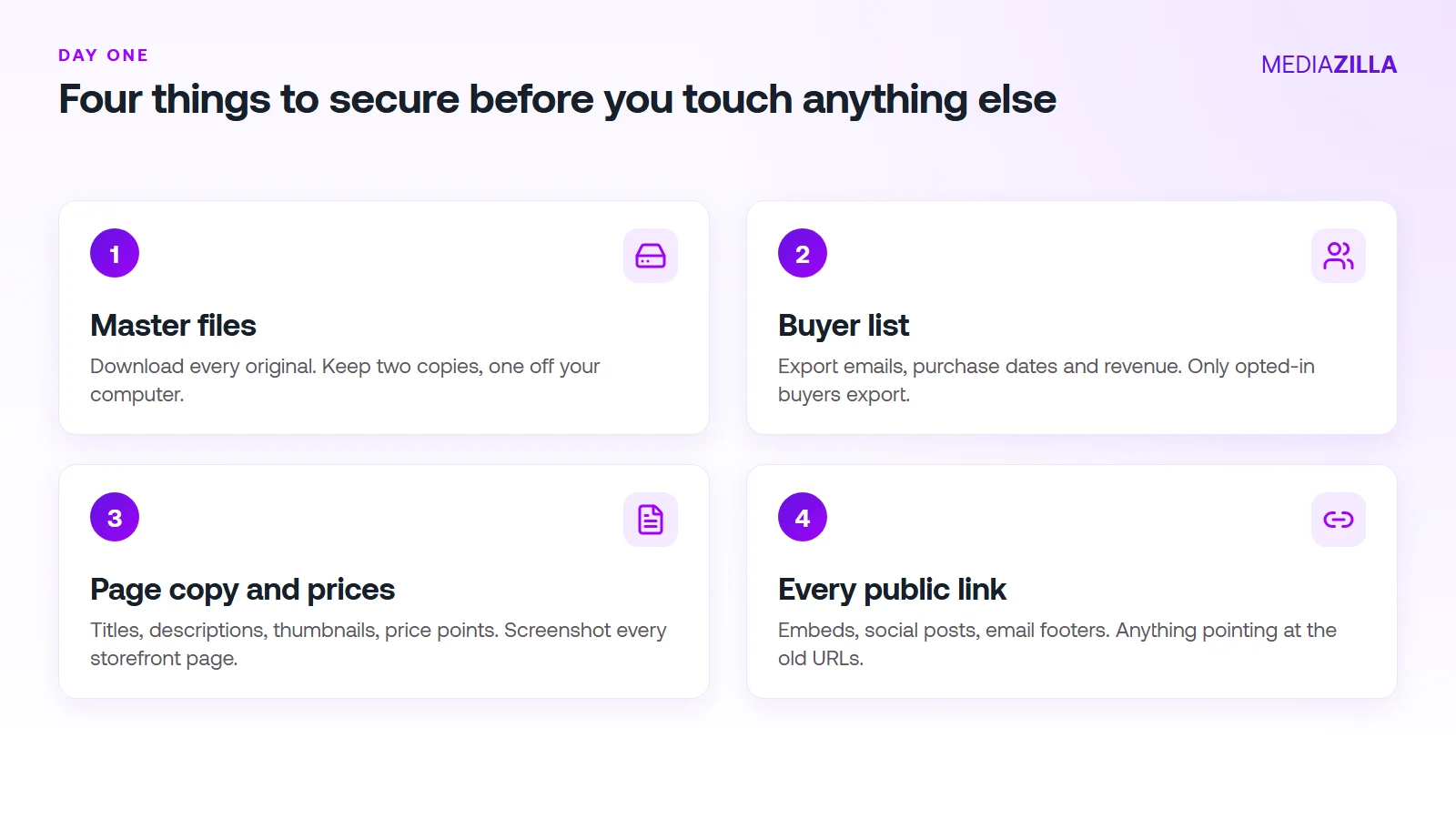
1. Master Files
Download every original. Keep two copies, one off your computer. Our guide to downloading and backing up your Vimeo On Demand videos walks through it.
2. Buyer List
Export emails, purchase dates, and revenue. Only buyers who opted into your communications will export. Compare that number to your total sales today. You need to know the gap now.
3. Page Copy and Prices
Screenshot every storefront page. Titles, descriptions, thumbnails, prices. You'll rebuild these in an afternoon if you have them. Without them, it takes a week.
4. Every Public Link
Website buttons, embeds, social posts, email footers. Anything that points at the old URLs. That list becomes your update checklist in week two.
What Does the 21-Day Plan Look Like?
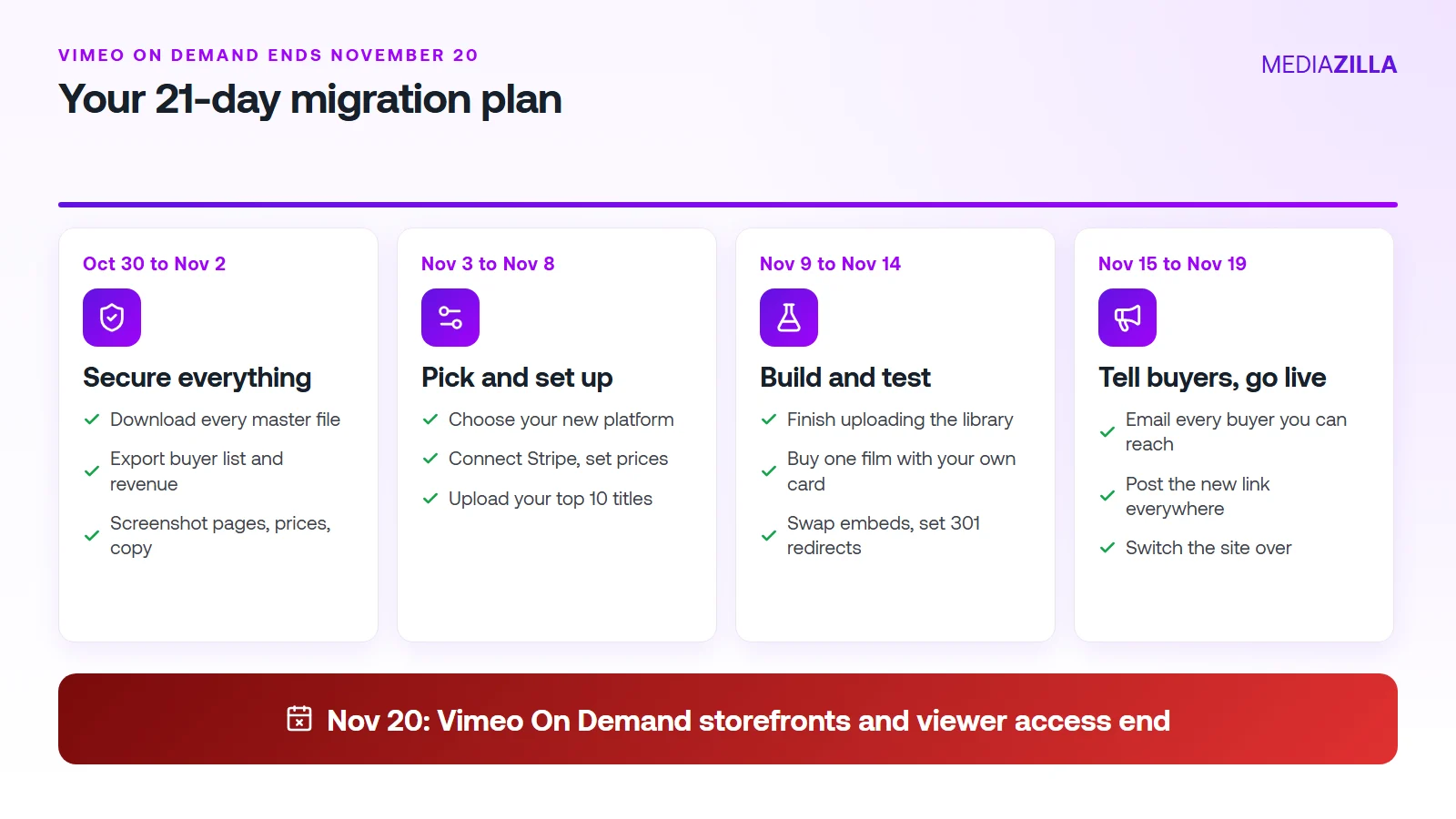
Days 1 to 4 (Oct 30 to Nov 2): Secure Everything
Do the four items above. Then stop. Don't compare pricing yet. Don't redesign anything. A finished backup is the milestone.
Days 5 to 10 (Nov 3 to Nov 8): Pick and Set Up
Choose your new platform. Connect Stripe. Set prices. Upload your ten best-selling titles first. Those are the ones buyers ask about.
Days 11 to 16 (Nov 9 to Nov 14): Build and Test
Upload the rest. Then buy one film with your own card and watch it on your phone and your TV. Swap every embed. Set 301 redirects for URLs on your own domain.
Days 17 to 21 (Nov 15 to Nov 19): Tell Buyers, Go Live
Email every buyer you can reach. Post the new link everywhere. Switch your site over. Leave November 20 for fixing surprises, not starting work.
How Do You Keep Your Buyers?
Purchases don't transfer on their own. A buyer who paid you $40for a recital in 2024 loses access on November 20 unless you move them. That's a refund request waiting to happen.
Send two emails, not one.
- The heads-up (around Nov 12). Tell them the old link stops working November 20. Promise a new link soon.
- The new link (Nov 15 to 17). Send the new link and a one-line instruction for getting their film.
Buyers you can't export are the hard part. For those, post on your site, social pages, and any studio newsletter. Say plainly: “Your film moved. Here's the new link.”
How Do You Pick a New Platform in a Week?
Skip the 30-tab research spiral. Check five things, in this order:
- Commission. On $12,000 in sales, a 10% plus $0.50 fee is $1,350 a year.
- DRM.Some hosts charge $165 a month for it. Check it's included.
- TV apps. Roku, Apple TV, Fire TV. Families watch on the big screen.
- Buyer import. Can you give past buyers access without charging them again?
- Exit terms. What happens to buyers if you leave? On MediaZilla, access survives even if you cancel.
MediaZilla charges 0% platform commission and $438 a year. Our Vimeo On Demand alternatives comparison shows the numbers side by side. And the video library migration guide has the longer checklist. Managed migration is available for approved sellers, so ask early.
What Mistakes Cost Sellers Most?
- Waiting to export. Do it day one. You may find the list is smaller than your sales count.
- Trusting a single backup. Two copies. Two places.
- Skipping the test purchase. Your first buyer shouldn't be your tester.
- Emailing once, late. Two emails. The first one early.
- Going live on November 19. Give yourself a few spare days.
You can still do this. But the days you spend deciding are days you don't get back. Stop researching. Start with the backup, today. Start your MediaZilla account and move your first film this week.
Frequently Asked Questions About the Vimeo On Demand Shutdown
How many days are left before Vimeo On Demand shuts down?
Is 21 days enough to migrate a video library?
Is Vimeo OTT shutting down too?
What should I do first if I only have a weekend?
Can I export all of my buyers from Vimeo On Demand?
Do my buyers keep access after November 20?
What does MediaZilla offer for sellers moving from Vimeo?
Should I redirect my old Vimeo links?
Featured Resource
Migrate from Vimeo On Demand before November 20
Apply for a free MediaZilla migration spot. Approved libraries move in 14 days - or we pay you $1,000.
Apply for free migration